I was tasked with integrating OneSpan (formerly VASCO) hardware token two-factor authentication into a Ruby stack — wrapping their proprietary VACMAN Controller C SDK for local OTP validation, and building a client for their OneSpan Authentication Server (originally named Identikey Authentication Server, and renamed mid-project) SOAP API. Neither had a Ruby library.
For vacman_controller there was a starting point: a Ruby C extension by Marcus Lankenau wrapping the AAL2 SDK. One commit, no releases, rough around the edges, but a solid foundation — linking, importing tokens and basic wrappers — was there. I forked it at IFAD, fixed it, extended it, and pushed 97 additional commits on top. 14 releases, v0.1.0 through v0.9.3.
For identikey there was nothing — OneSpan ships a Java SDK, no Ruby library exists. I wrote one from scratch: 123 commits, 18 tags, v0.2.0 through v0.9.1.
Both are on GitHub. Here’s what’s inside.
vacman_controller
The vacman_controller gem is a Ruby C extension wrapping OneSpan’s AAL2 SDK — a proprietary, closed-source C library for managing DIGIPASS hardware tokens. The SDK ships as a static library with a header file, no source, no debug symbols, and documentation that reads like it was translated from Dutch through a fax machine. Your job is to link against it and pray. The extconf.rb handles the prayer — it auto-discovers the SDK by globbing /opt/vasco/VACMAN_Controller-*, picks the latest version, and links with -rpath so the shared library resolves at runtime without LD_LIBRARY_PATH games.
The Authentication Server manages tokens internally and exposes OTP validation and administration through its API — but we needed to manage tokens directly as well, for a specific use case.
When you manage a token yourself, the core requirement is state persistence: the token blob mutates on every operation and must be saved back after each one. I chose to serialize it as a plain Ruby hash — a flat key-value structure that gives you maximum convenience for serialization and interop with whatever storage or transport you end up using.
A token blob is all that’s needed to generate OTPs — the AAL2 SDK artificially prevents it, but the seeds are in there. Treat blobs like private keys: never log them, never expose them outside the datastore, never include them in API responses. If a blob leaks, 2FA trust for that token is broken.
The gem bridges the SDK’s C struct world and this Ruby hash world, and the bridge is where all the interesting engineering lives.
The C-to-Ruby bridge

The central data structure in the AAL2 SDK is TDigipassBlob — an opaque struct containing the token’s serial number, application name, flags, and a 224-byte Blob field that holds encrypted token state. Every SDK call takes a pointer to this struct, mutates it in place, and expects you to persist the changes.
The gem doesn’t wrap TDigipassBlob in a Ruby object — it serializes the struct to a plain hash that can round-trip through a database column, a background job queue, or anywhere else token state needs to travel. The serialization layer in serialize.c converts back and forth:
void vacman_rbhash_to_digipass(VALUE token, TDigipassBlob* dpdata) {
  VALUE blob     = rbhash_get_key(token, "blob",     T_STRING);
  VALUE serial   = rbhash_get_key(token, "serial",   T_STRING);
  VALUE app_name = rbhash_get_key(token, "app_name", T_STRING);
  VALUE flag1    = rbhash_get_key(token, "flags1",   T_FIXNUM);
  VALUE flag2    = rbhash_get_key(token, "flags2",   T_FIXNUM);

  memset(dpdata, 0, sizeof(*dpdata));

  strcpy(dpdata->Blob, rb_string_value_cstr(&blob));
  strncpy(dpdata->Serial, rb_string_value_cstr(&serial), sizeof(dpdata->Serial));
  strncpy(dpdata->AppName, rb_string_value_cstr(&app_name), sizeof(dpdata->AppName));
  dpdata->DPFlags[0] = rb_fix2int(flag1);
  dpdata->DPFlags[1] = rb_fix2int(flag2);
}
And the reverse direction, packing the struct back into a Ruby hash:
void vacman_digipass_to_rbhash(TDigipassBlob* dpdata, VALUE hash) {
  char buffer[256];

  memset(buffer, 0, sizeof(buffer));
  strncpy(buffer, dpdata->Serial, 10);
  rb_hash_aset(hash, rb_str_new2("serial"), rb_str_new2(buffer));

  memset(buffer, 0, sizeof(buffer));
  strncpy(buffer, dpdata->AppName, 12);
  rb_hash_aset(hash, rb_str_new2("app_name"), rb_str_new2(buffer));

  memset(buffer, 0, sizeof(buffer));
  strncpy(buffer, dpdata->Blob, 224);
  rb_hash_aset(hash, rb_str_new2("blob"), rb_str_new2(buffer));

  rb_hash_aset(hash, rb_str_new2("flags1"), rb_fix_new(dpdata->DPFlags[0]));
  rb_hash_aset(hash, rb_str_new2("flags2"), rb_fix_new(dpdata->DPFlags[1]));
}
The pattern is: deserialize the Ruby hash into a stack-allocated TDigipassBlob, call the SDK function (which mutates the struct), then serialize the struct back into the same Ruby hash. The hash is the token — it travels from Ruby to C and back, accumulating state changes along the way. Everything is stack-allocated, so no memory management headaches and no thread safety concerns on this side of the fence.
There’s also a variant, vacman_rbhash_to_digipass_sv, that handles an additional "sv" key for the token’s static vector — needed for offline activation code generation via AAL2GenActivationCodeXErc. When provisioning a new soft token, the activation code lets the user’s device sync with the server without a round-trip. Not every token has a static vector — the "sv" key is only present on tokens imported from DPX files that include one.
Importing tokens

Tokens arrive as .dpx files — encrypted containers holding token seeds and initialization parameters. You decrypt them with a transport key that OneSpan provides separately. The import flow in dpx.c opens the DPX, then loops over its contents extracting tokens one at a time:
VALUE vacman_dpx_import(VALUE module, VALUE filename, VALUE key) {
  TDPXHandle dpx_handle;
  aat_int16  appl_count;
  aat_ascii  appl_names[13*8];
  aat_int16  token_count;

  aat_int32 result = AAL2DPXInit(&dpx_handle,
                                 rb_string_value_cstr(&filename),
                                 rb_string_value_cstr(&key),
                                 &appl_count,
                                 appl_names,
                                 &token_count);

  if (result != 0) {
    vacman_library_error("AAL2DPXInit", result);
    return Qnil;
  }

  // ...

  VALUE list = rb_ary_new();

  while (1) {
    result = AAL2DPXGetToken(&dpx_handle,
        &g_KernelParms,
        appl_names,
        sw_out_serial_No,
        sw_out_type,
        sw_out_authmode,
        &dpdata);

    if (result < 0) {
      vacman_library_error("AAL2DPXGetToken", result);
      return Qnil;
    }

    if (result == 107) break;

    VALUE hash = rb_hash_new();
    vacman_digipass_to_rbhash_sv(&dpdata, sw_out_static_vector, hash);
    rb_ary_push(list, hash);
  }

  AAL2DPXClose(&dpx_handle);
  return list;
}
Notice the if (result == 107) break; — that’s the “end of file” sentinel. Not EOF, not -1, not a named constant: the magic number 107. The AAL2 documentation doesn’t mention it. This was already in Marcus’s original code. Negative results are errors, zero means “here’s a token,” and 107 means “no more tokens.”
One subtle point: AAL2DPXInit does not validate the transport key. If you pass the wrong key, you don’t get an error — you get tokens that generate wrong OTPs. You’ll only discover the mistake later, when real users can’t authenticate. Fun.
The SDK’s error messages are equally helpful. Every SDK error passes through vacman_library_error in the C layer, which creates a Ruby exception with structured metadata — @library_method, @error_code, @error_message — attached via rb_iv_set:
VALUE exc = rb_exc_new2(e_VacmanError, error_message);
rb_iv_set(exc, "@library_method", rb_str_new2(method));
rb_iv_set(exc, "@error_code",     INT2FIX(vacman_error_code));
rb_iv_set(exc, "@error_message",  rb_str_new2(vacman_error_message));
rb_exc_raise(exc);
The Ruby wrapper then translates undocumented error codes: -15 becomes “invalid transport key”, -20 becomes “cannot open DPX file”. OneSpan’s own AAL2GetErrorMsg returns nothing useful for either.
OTP verification
The core operation — verifying a one-time password — lives in token.c. The C function follows the deserialize-call-serialize pattern:
VALUE vacman_token_verify_password(VALUE module, VALUE token, VALUE password) {
  TDigipassBlob dpdata;

  vacman_rbhash_to_digipass(token, &dpdata);

  aat_int32 result = AAL2VerifyPassword(&dpdata, &g_KernelParms,
                                         rb_string_value_cstr(&password), 0);

  vacman_digipass_to_rbhash(&dpdata, token);

  if (result == 0)
    return Qtrue;
  else {
    vacman_library_error("AAL2VerifyPassword", result);
    return Qnil;
  }
}
The critical subtlety here: vacman_digipass_to_rbhash(&dpdata, token) runs regardless of whether the OTP was valid. This is intentional. AAL2VerifyPassword mutates the TDigipassBlob on every call — it increments error counters on failure, adjusts time drift windows on success, and updates internal sequence state. The token blob after verification is different from the token blob before verification, whether the OTP was right or wrong. If you discard the post-verification state, the token drifts out of sync with the server and becomes unusable.
On the Ruby side, Token#verify wraps this:
def verify(otp)
  verify!(otp)
rescue VacmanController::Error
  false
end

def verify!(otp)
  VacmanController::LowLevel.verify_password(@token_hash, otp.to_s)
end
Two flavors: verify! raises on failure (for controllers that want to flash an error message), verify returns a boolean (for background jobs that check OTPs and move on). Both call through to the same C function. Both mutate @token_hash in place. The ATTENTION comment in the source makes it explicit: you must persist token.to_h after every verification call. Skip the persistence step, and you’ll spend a week debugging why tokens work for the first OTP and then reject everything after.
This extends to every SDK operation. Setting a property, changing a PIN, resetting error counts — they all follow the same pattern in token.c: deserialize, call the vendor function, serialize back. The hash is always mutated, and the caller is always responsible for saving it.
Thread-safe kernel parameters
The AAL2 SDK has a global TKernelParms struct — g_KernelParms — that configures runtime behavior: time windows, iteration counts, and other parameters that apply to all token operations. In a multi-threaded Ruby application (Puma, Sidekiq), concurrent writes to this struct would corrupt it.
The Kernel module handles this with a Mutex on the setter only:
module VacmanController
  module Kernel
    class << self
      def [](name)
        VacmanController::LowLevel.get_kernel_param(name)
      end

      def []=(name, val)
        Mutex.synchronize do
          VacmanController::LowLevel.set_kernel_param(name, val)
        end
      end

      Mutex = Thread::Mutex.new
    end
  end
end
No mutex on reads. Kernel parameters are set once at boot and rarely changed after — this is a read-heavy, write-almost-never access pattern. Locking every read would add contention for zero benefit. The Mutex protects against the rare case where two threads try to reconfigure the kernel simultaneously, and nothing else.
Token properties
The AAL2 SDK exposes over 40 properties per token — pin_enabled, error_count, auth_mode, virtual_token_grace_period, and dozens more. Each property is identified by a numeric constant in the C header. The C layer in token.c maps human-readable names to these IDs through a static registry, with aliases so callers can use either OneSpan’s cryptic abbreviations or expanded names:
static struct token_property vacman_token_properties[] = {
  {"pin_ch_on",          PIN_CH_ON       },
  {"pin_change_enabled", PIN_CH_ON       },
  {"pin_len",            PIN_LEN         },
  {"pin_length",         PIN_LEN         },
  {"response_chk",       RESPONSE_CHK    },
  {"response_checksum",  RESPONSE_CHK    },
  {"use_3des",           TRIPLE_DES_USED },
  {"triple_des_used",    TRIPLE_DES_USED },
  // ...40+ entries
};
pin_ch_on and pin_change_enabled resolve to the same PIN_CH_ON constant. OneSpan’s documentation uses the abbreviations; the gem also exposes expanded names so callers write self-documenting code instead of guessing what pin_ch_on means.
On the Ruby side, Token::Properties wraps this with method_missing for natural getter/setter syntax — token.properties.pin_enabled reads, token.properties.token_status = :disabled writes:
def method_missing(name, *args, &block)
  prop, setter = name.to_s.match(/\A(.+?)(=)?\Z/).values_at(1, 2)
  if setter
    self[prop] = args.first
  else
    self[prop]
  end
end
The interesting part is the type casting layer underneath. The AAL2 SDK speaks only integers and strings. The Ruby side translates in both directions. On reads, read_cast converts "YES"/"NO" to true/false, timestamps like "Wed Jan 01 00:00:00 2020" to Time objects, authentication modes to symbols — :response_only, :challenge_response, :multi_mode. On writes, write_cast! enforces constraints with better error messages than the SDK would give you:
when 'pin_change_forced'
  if value
    1
  else
    raise VacmanController::Error,
      "Token property #{property} cannot be set to #{value.inspect}"
  end

when 'token_status'
  case value
  when :disabled     then 0
  when :primary_only then 1
  when :backup_only  then 2
  when :enabled      then 3
  else
    raise VacmanController::Error,
      "Token property #{property} cannot be set to #{value.inspect}"
  end
pin_change_forced is a one-way flag — you can force a PIN change but you can’t un-force it, so the setter raises instead of silently failing. token_status maps Ruby symbols to the integer values the SDK expects. pin_enabled maps true to 1 and false to 2 — yes, 2, not 0, because OneSpan. Bounded integer properties like pin_minimum_length (3–8) and virtual_token_grace_period (1–364) get range validation. Forty-plus properties, each with its own type semantics, all behind a consistent interface that makes OneSpan’s integer-obsessed C API feel like a Ruby object.
The binary patch

The AAL2 SDK can verify OTP codes. It can also generate them — but only for a small set of demo tokens that OneSpan ships for development purposes. For real hardware tokens and software tokens, generation is locked out entirely. You hand it a seed, it tells you yes or no on a submitted OTP, but it won’t tell you what the OTP should be.
This is an artificial limitation enforced at runtime. But the code is there — it has to be. OTP verification is not a simple string comparison; the library must internally generate the expected OTP from the token’s seed and current time window in order to verify the one submitted by the user. The generation logic exists. It’s the same code path. The SDK exposes it for demo tokens and locks it out for everything else.
Out of research curiosity, I went looking for that check in the binary — and found it. The repo includes ext/libaal2sdk-3.15.1.so.vtoken.bspatch — a bsdiff patch you apply against the proprietary .so to unlock software OTP generation for all token types, as long as you have the seeds.
What this could unlock in practice: testing and CI. Imagine running a full token verification test suite without a physical DIGIPASS on the desk, without being limited to OneSpan’s handful of demo tokens. But that’s a separate story.
This is completely unsupported. It will absolutely void any support contract you have with OneSpan. If you know what you’re doing, the patch is there. Ship accordingly.
This is also why token blobs must be treated like private keys. With the patched library and a leaked blob, anyone can generate valid OTPs for that token — no hardware device needed. Keep blobs in the datastore, keep them out of logs, and never expose them through an API.
identikey

The identikey gem is a different beast entirely. It talks to the OneSpan Authentication Server — the enterprise 2FA server product. When I started this work it was called Identikey Authentication Server; OneSpan renamed it mid-project, but the gem still carries the old name. Where vacman_controller wrestles with a C SDK and opaque structs, identikey wrestles with SOAP — specifically, with OneSpan’s interpretation of what SOAP should look like, which bears the same relationship to the WS-I standard that a fever dream bears to a lucid thought.
The server exposes three separate SOAP endpoints: Authentication, Administration, and Provisioning. Each has its own WSDL, its own response format, its own idea of what “success” means. The gem uses Savon to do the heavy lifting and wraps the three endpoints in a shared Base class that papers over the inconsistencies.
The SOAP labyrinth
The first surprise comes from Savon itself. When you reconfigure the WSDL path at runtime — say, to point at a test fixture instead of the production server — Savon’s client.globals updates the path but the internal client.wsdl object keeps pointing at the old one. The configure method works around this:
def self.configure(&block)
  self.client.globals.instance_eval(&block)

  # Work around a sillyness in Savon
  if client.globals[:wsdl] != client.wsdl.document
    client.wsdl.document = client.globals[:wsdl]
  end
end
A two-line fix for a bug that took an hour to track down. The comment says “sillyness” because what else do you call a configuration API that silently ignores half the configuration?
The attribute problem
Here’s where OneSpan’s SOAP design goes from “annoying” to “adversarial.” In a sane SOAP API, a user object comes back with named XML elements — <userId>john</userId>, <email>john@example.com</email>. You parse it, you get a hash with meaningful keys. Done.
OneSpan doesn’t do that. Every single attribute comes as a pair of generic elements — <attributeID> containing the field name and <value> containing the field value. The same flat structure, for every attribute, on every response. A user query returns a dozen <attributeID>/<value> pairs that you have to zip together yourself to figure out which value belongs to which field. The values come back as untyped strings — no schema, no type annotations. You’re on your own figuring out whether "1" is an integer, a boolean, or a string.
Sending data back is actually better — the server expects each <value> to carry an xsi:type annotation (xsd:unsignedInt, xsd:dateTime, xsd:boolean). Having types on the write path is sane. What’s not sane is the asymmetry: no types on the way in, types on the way out. And the types themselves aren’t in the WSDL — they’re defined only in the documentation and in the server code. The WSDL describes the structure (a list of generic attribute elements) without saying what type each attribute should be. As the rant comment in the source puts it: “This code should not exist, because defining argument types is what WSDL is for.”
The untyped read path also breaks standard tooling. Savon’s built-in log filtering works on element names. You tell it “filter out the <password> element” and it redacts the value. But there is no <password> element. There’s an <attributeID> with the text CREDFLD_PASSWORD and a sibling <value> with the actual password. Standard filters can’t express “find the <value> element that is a sibling of an <attributeID> whose text content is this specific string.”
So the gem implements XPath-based filtering:
def self.identikey_filter_proc_for(attribute)
  lambda do |document|
    document.xpath("//attributeID[text()='#{attribute}']/../value").each do |node|
      node.content = '***FILTERED***'
    end
  end
end
Walk up from the <attributeID> to its parent, then back down to the sibling <value>, and blank it. The default filters use the identikey: prefix convention to distinguish these from standard Savon filters:
filters: [
  'sessionID',
  'staticPassword',
  'identikey:CREDFLD_PASSWORD',
  'identikey:CREDFLD_STATIC_PASSWORD',
  'identikey:CREDFLD_SESSION_ID'
]
Standard Savon filters and custom XPath filters, coexisting in the same list. The process_identikey_filters method splits them apart at initialization and converts the identikey: ones into lambda procs. It works. It shouldn’t have to exist.
When success isn’t success

The Authentication API has a beautiful trap for the unwary. You call auth_user with a username and OTP, you get back a status code. STAT_SUCCESS means authentication passed, anything else means it didn’t. Simple, right?
Not if you’re using push OTP.
With push notifications, the server sends a challenge to the user’s phone. If the user hasn’t responded yet — or if the password is wrong — the server returns STAT_SUCCESS anyway, but stuffs a “password is wrong” message into the CREDFLD_STATUS_MESSAGE attribute. The status code lies. The error is hiding in an optional field that you have to know to look for.
The otp_validated_ok? method encodes this hard-won knowledge:
# For all cases, except where the OTP is "push", Identikey returns a
# status that is != than `STAT_SUCCESS`. But when the OTP is "push",
# then Identikey returns a `STAT_SUCCESS` with a "password is wrong"
# message in the `CREDFLD_STATUS_MESSAGE`.
#
# This method checks for both cases.. Success means a `STAT_SUCCESS`
# and nothing in the `CREDFLD_STATUS_MESSAGE`.
#
def self.otp_validated_ok?(status, result)
  status == 'STAT_SUCCESS' && !result.key?('CREDFLD_STATUS_MESSAGE')
end
Success means STAT_SUCCESS and the absence of an error message. Not the presence of a success message — the absence of a failure message. The distinction matters. Without this check, push OTP authentication silently “succeeds” when it shouldn’t, which is the kind of security bug that keeps you up at night.
The public API exposes this in two forms — valid_otp? for boolean checks and validate! for exception-raising validation. Both go through the same otp_validated_ok? gate.
Typed attributes
The typed_attributes_query_list_from method lets callers pass plain Ruby values — an Integer, a Time, a String — and serializes them into the xsi:type-annotated XML that the server expects. Pass the wrong type and you get a SOAP fault back:
def self.typed_attributes_query_list_from(hash)
  hash.map do |full_name, value|

    parse = /^(not_)?(.*)/i.match(full_name.to_s)
    name  = parse[2]

    options = {}
    options[:negative] = true if !parse[1].nil?

    type, value = case value

    when Unsigned
      [ 'xsd:unsignedInt', value.to_s ]

    when Integer
      [ 'xsd:int', value.to_s ]

    when Time
      [ 'xsd:dateTime', value.utc.iso8601 ]

    when TrueClass, FalseClass
      [ 'xsd:boolean', value.to_s ]

    when Symbol, String
      [ 'xsd:string', value.to_s ]

    when NilClass
      options[:null] = true
      [ 'xsd:string', '' ]

    else
      raise Identikey::UsageError, "#{full_name} type #{value.class} is unsupported"
    end

    { attributeID:      name,
      attributeOptions: options,
      value: { '@xsi:type': type, content!: value } }
  end.compact
end
Notice the Unsigned type in the case statement. Ruby’s Integer maps to xsd:int, but OneSpan uses xsd:unsignedInt for certain fields like CREDFLD_PASSWORD_FORMAT. The gem ships an Unsigned wrapper class that extends BasicObject and delegates everything to the underlying integer, existing solely as a type tag for the serialization layer. A whole class, so case value; when Unsigned can pick the right XSD type.
Searching
Throughout the gem, I strived to present a Rubyesque interface — something that follows the principle of least surprise and looks familiar to anyone who’s worked with ActiveRecord or similar Ruby libraries. The Administration API’s search interface is a good example. Under the hood it’s the same <attributeID>/<value> machinery, but at the caller level it looks like this:
# Find locked users in a domain
session.search_users(domain: 'master', locked: true)

# Find expired tokens of a specific type
session.search_digipasses(expired: true, type: 'DP4MOBILE')

# Find users who do NOT have a token assigned
session.search_users(not_has_digipass: true)
The gem translates these Ruby hashes into OneSpan’s attribute format. domain: 'master' becomes {attributeID: 'USERFLD_DOMAIN', value: {'@xsi:type': 'xsd:string', content!: 'master'}}. locked: true becomes {attributeID: 'USERFLD_LOCKED', value: {'@xsi:type': 'xsd:boolean', content!: 'true'}}. The search_attributes_from method maps friendly keys to OneSpan attribute names via a per-model attribute map ('domain' => 'USERFLD_DOMAIN', 'email' => 'USERFLD_EMAIL', etc.), and the NOT_ prefix gives you negation for free — no special API needed.
Enterprise quirks
The Session class manages authentication against the Administration API, and it has to support two completely different authentication modes for two different use cases.
Classic mode: a human administrator managing tokens and users through the API. Username and password, call logon, get a session ID, use it for subsequent calls, call logoff when done. Standard session lifecycle.
API key mode: a service account performing OTP verification programmatically. When your application needs to validate a user’s OTP, it doesn’t have — and shouldn’t need — interactive credentials. The session ID is "Apikey #{username}:#{apikey}", a synthetic token the gem constructs locally. Service users skip the logon/logoff dance entirely:
def initialize(username:, password: nil, apikey: nil, domain: 'master')
  if password.nil? && apikey.nil?
    raise Identikey::UsageError, "Either a password or an API Key is required"
  end

  @client = Identikey::Administration.new

  @username = username
  @password = password
  @domain   = domain

  if apikey
    @service_user = true
    @session_id = "Apikey #{username}:#{apikey}"
  end
end
The two modes need guard rails. Classic users must logon before doing anything; service users must never call logon (it would fail). The require_classic_user! and require_logged_on! methods enforce this at the right boundaries.
Then there are privileges. When a classic user logs on, the server returns their privileges as a comma-separated string: "PRIV_REPORT true, PRIV_USER_ADMIN true, PRIV_DIGIPASS_ADMIN false". Not XML. Not JSON. Not even key-value pairs in any recognizable format. Just a flat string with commas between privilege entries and spaces between the name and its boolean value.
The parsing is grimly straightforward:
def parse_privileges(privileges)
  privileges.split(', ').inject({}) do |h, priv|
    privilege, status = priv.split(' ')
    h.update(privilege => status == 'true')
  end.freeze
end
Split on comma-space, split each piece on space, compare the second half to the string "true". This is the kind of code you write when the vendor’s idea of structured data is “concatenate some strings and hope for the best.” It works, it’s tested, and it’s a monument to the distance between “enterprise-grade” marketing and enterprise-grade engineering.
CRONTO visual cryptograms
The Provisioning API handles device enrollment — registering mobile apps for push notification-based authentication. It wraps two incompatible API designs in one module: the old-style provisioningExecute with the same generic <attributeID>/<value> pairs as the rest of the API, and the newer dsappSRPRegister with properly typed WSDL responses. The parsing layer detects which format came back and handles both transparently — because of course OneSpan couldn’t be bothered to keep their own API consistent across endpoints.
The payoff is CRONTO activation. CRONTO is OneSpan’s visual cryptogram technology — not a standard black-and-white QR code, but a matrix of colored dots encoding encrypted data. Red, green, blue — a full-color barcode that the user scans with a phone camera or a dedicated DIGIPASS device to decode transaction details or complete enrollment.
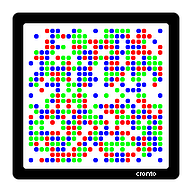
The cronto_code_for_srp_registration class method ties it together. It calls SRP registration, composes a proprietary activation string with a fixed header and semicolon-delimited fields, then hex-encodes it character by character into the format that a CRONTO image renderer expects:
def self.cronto_code_for_srp_registration(gateway:, **kwargs)
  status, result, error = new.dsapp_srp_register(**kwargs)

  if status != 'STAT_SUCCESS'
    raise Identikey::OperationFailed,
      "Error while assigning DAL: #{status} - #{[error].flatten.join('; ')}"
  end

  message = '01;01;%s;%s;%s;%s;%s' % [
    result[:user][:user_id],
    result[:user][:domain],
    result[:registration_id],
    result[:activation_password],
    gateway
  ]

  return message.split(//).map {|c| '%x' % c.ord}.join
end
The hex string feeds into a companion gem that renders the colored dot matrix as a PNG, delivered to users during push notification enrollment. The 01;01; prefix, the semicolons, the per-character hex encoding — none of this is in the public documentation. The CRONTO format is proprietary, the encoding is proprietary, and the only way to get it right is to match OneSpan’s reference implementation byte for byte.
vacman_controller and identikey are on GitHub. Hardware 2FA shouldn’t require a Java SDK or a fax-machine manual. It still doesn’t.
Open source from the IFAD years: ChronoModel (2012) • data-confirm-modal (2013) • Hermes (2013) • Eaco (2015) • Heathen → Colore (2016) • TM → Pontoon (2018) • ChronoModel 1.0 (2019) • OneSpan 2FA (2020) • ansible-wsadmin (2026)