WiFi Presence Detection for Home Assistant Using OpenWrt
I had two problems with Home Assistant’s presence detection.
The first: GPS tells you if someone is home, but not where in the house they are. My home has six OpenWrt access points spread across three floors. They already know exactly which phone is connected to which AP at every moment — that’s room-level presence data, sitting right there in the WiFi stack, screaming to be used. Knowing who’s in which room opens up a whole class of automations that GPS can’t touch: lights that follow you, climate control per occupied room, a dashboard that shows the household at a glance.
The second: our housekeeper stays at our place a couple days a week. I don’t want to set up a full HA account for her, install the companion app on her phone, or deal with GPS permissions. But I do need to know if she’s home — because my alarm automation needs to know whether the house is actually empty before arming. Her phone connects to WiFi. That’s all I need.
So I wrote openwrt-ha-presence: a state machine that scrapes RSSI metrics directly from your OpenWrt APs, figures out which room each person is in by signal strength, and publishes per-person home/away state to Home Assistant via MQTT Discovery. No cloud, no beacons, no log parsing, no time-series database. Python, async, ~600 lines of actual logic.
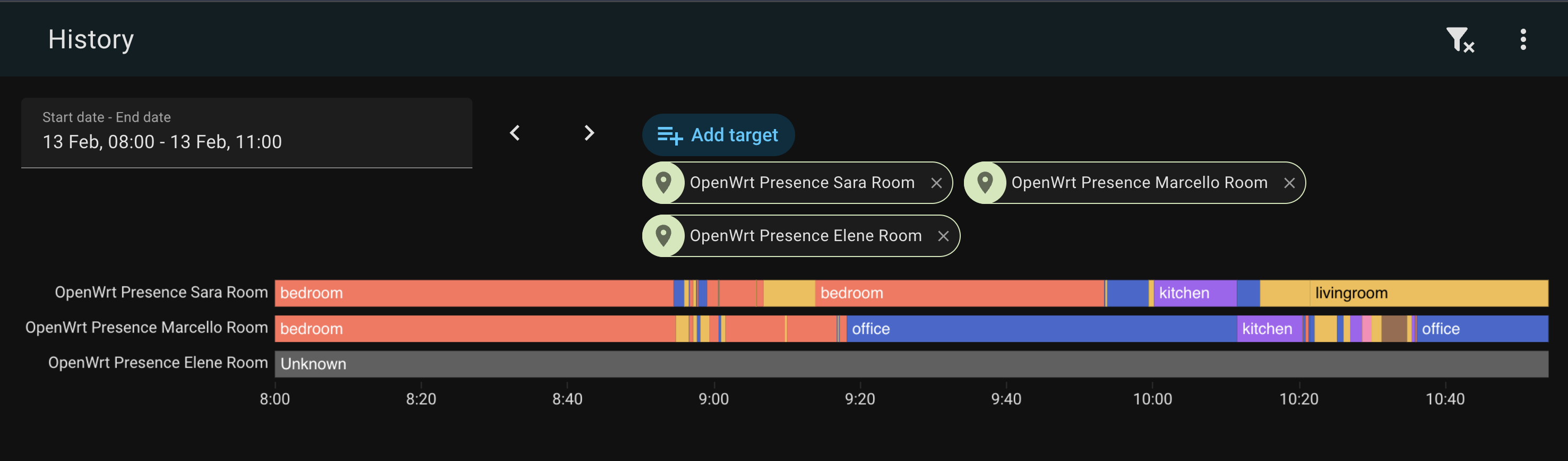
How It Works
OpenWrt APs  →  openwrt-presence  →  MQTT  →  Home Assistant
 (node-exporter-lua)  (state machine)    (discovery)   (device_tracker + sensor)
Every 5 seconds, openwrt-presence hits the /metrics endpoint on each AP and grabs wifi_station_signal_dbm for every associated station. That’s the RSSI — how loud your phone’s signal is at that AP. The engine then processes the snapshot:
- Visible MAC → CONNECTED. Room = AP with the strongest RSSI.
- Disappeared MAC (was visible, now gone from all APs) → DEPARTING. A departure timer starts.
- Timer expires → AWAY. The person has left the house.
- Reappears before timeout → CONNECTED again. Timer cancelled. Welcome back.
Exit vs Interior Nodes
Not all APs are equal. Disconnecting from your garden AP means something very different than disconnecting from your bedroom AP. Your phone goes dark on the bedroom AP? It probably dozed. Your phone goes dark on the garden AP? You probably walked out.
So nodes can be marked as exit or interior (the default):
- Exit nodes (garden): device disappears → short timeout (
departure_timeout, mine is 120s). If you don’t reappear on any AP, you’ve left. - Interior nodes (office, bedroom, kitchen): device disappears → long safety-net timeout (
away_timeout, default 18h). Your phone dozed? Don’t care. Come back whenever.
This is opt-in. If you don’t mark any nodes as exit, all nodes use departure_timeout — simple and flat. But if you have an AP at the entrance to your house, mark it exit: true and enjoy fast departure detection without false positives from phone doze on interior APs.
Room selection uses the strongest RSSI. Your phone is in whichever room hears it loudest.
For each person, HA gets:
device_tracker.<person>_wifi—home/not_homesensor.<person>_room—office,bedroom,kitchen, etc.
Auto-discovered via MQTT. Zero manual HA config.
The Journey
The current design is the third iteration. Getting here was… educational.
Attempt 1: Hostapd Log Events
The first version parsed AP-STA-CONNECTED and AP-STA-DISCONNECTED events from hostapd logs. Each AP shipped its syslog to VictoriaLogs, and my engine tailed the log stream for WiFi events.
The architecture was event-driven and felt elegant. On paper.
OpenWrt APs → VictoriaLogs → openwrt-presence → MQTT → HA
  (hostapd)    (log store)    (state machine)   (discovery)
WiFi presence sounds trivial until you actually try it. Your phone disconnects from WiFi constantly — AP roaming, screen-off power saving, the 37 daily reconnections your iPhone does for absolutely no reason. If you naively map “disconnect = left the house,” you’ll be marked as away every time you walk to the kitchen.
So I came up with the exit vs interior node model:
- Interior nodes (office, bedroom, kitchen): disconnects are straight up ignored. Only connects update your current room.
- Exit nodes (garden): disconnect starts a departure timer. If you don’t reconnect to any AP within 120 seconds, you’ve left.
This eliminated 99% of the noise. And then production happened.
Clock skew: a love story
Four out of six APs didn’t have NTP enabled. The garden AP — the exit node, the one whose timestamps actually matter for departure detection — was running 3.5 minutes behind. This meant the 2-minute departure timeout was effectively negative. People who had clearly left were never marked as away because the timestamps said they hadn’t been gone long enough. Ask me how I found this.
Backfill ordering
On startup, the engine backfilled the last 4 hours from VictoriaLogs to rebuild state. Problem: VictoriaLogs returns results grouped by log stream (per-AP), not in global chronological order. So if the last stream returned is from the office, you end up in the office — even if the most recent event was from the livingroom. Fix: sort all backfill events by timestamp before processing. Simple, once you stop trusting the API to do it for you.
Sara’s phone: 3,821 events in 10 days
This was the best one. My wife Sara has an iPhone 16 Pro. I have an iPhone 16 Pro Max. Same house, same APs, same network. Yet her phone was generating 3.4x more WiFi events than mine. 78% of all her events were flapping — rapid connect/disconnect cycles on the same AP.
The diagnosis: two APs (office on the first floor, livingroom on the ground floor) stacked vertically with both running at 23 dBm — maximum transmit power. Through a 2.7m Italian concrete ceiling, Sara’s phone was seeing nearly identical signal strength from both APs and thrashing between them every 1-3 seconds. Her worst oscillation streak: 161 connects, bouncing back and forth like a ping-pong ball.
802.11r Fast Transition was making it worse — sub-second roaming meant the phone could thrash faster than it could with full re-authentication.
Fix: dropped TX power from 23 to 14 dBm on interior APs, and configured usteer’s min_connect_snr and min_snr thresholds to prevent weak associations. The phone can’t thrash between APs if the AP refuses to talk to it.
The event-based approach worked, eventually. But it was fragile in a fundamental way: it depended on log events being emitted and delivered. If an AP never fires a disconnect (because the phone drifted out of range rather than cleanly disassociating), the engine never knows. You need a safety-net timeout, you need to distinguish node types, you need to handle clock skew, you need to sort backfill events, you need to survive log pipeline hiccups. That’s a lot of “you need to” for a presence detector.
Attempt 2: VictoriaMetrics + RSSI Metrics
I was already running prometheus-node-exporter-lua on every AP for system metrics (CPU, memory, the usual). The wifi_stations collector exposes wifi_station_signal_dbm per associated station — RSSI, right there, already being collected by Telegraf and stored in VictoriaMetrics every 5 seconds.
So I rewrote the engine to query VictoriaMetrics instead of parsing logs. No more events — just periodic RSSI snapshots. Room selection by strongest signal instead of most-recent-connect. The exit/interior node model carried over, now controlling which timeout to apply when a device vanished from all APs. Much cleaner.
But something was off. Detection felt… sluggish. When I walked from one room to another, the state change took ages. Walk tests confirmed it: the max_inactivity fix on the WiFi driver was working perfectly — the AP cleared my phone from its association list in 12 seconds. But VictoriaMetrics was 29 seconds behind. The phone appeared on albert’s assoclist at 11:30:21, but VictoriaMetrics didn’t show it until 11:30:50.
Twenty-nine seconds. That’s not a rounding error. That’s the entire Telegraf → VictoriaMetrics pipeline adding latency that I couldn’t eliminate.
And then I found the smoking gun in Telegraf’s logs:
[outputs.http] did not complete within its flush interval
[outputs.http] Metric buffer overflow; 25297 metrics have been dropped
Twenty-five thousand metrics, dropped. Telegraf was choking on the volume of metrics from six APs (WiFi stations, system stats, network interfaces — it adds up), and the HTTP output to VictoriaMetrics couldn’t keep up. The RSSI data was stale before it even reached VictoriaMetrics.
I could have tuned flush intervals, increased buffer sizes, added a second Telegraf instance. But that’s treating the symptom. The real question was: why am I routing presence-critical data through a general-purpose metrics pipeline?
Attempt 3: Cut Out the Middleman
The data I need is already sitting right there on each AP — wifi_station_signal_dbm, exposed at http://ap-hostname:9100/metrics in Prometheus text format. I was adding an entire TSDB pipeline between my presence engine and a simple HTTP endpoint that’s already running.
So I threw away VictoriaMetrics as a data source entirely and wrote ExporterSource: a simple async HTTP client that scrapes each AP directly, in parallel, every 5 seconds. No Telegraf. No VictoriaMetrics. No pipeline latency. No buffer overflows. Just six HTTP GETs and a regex.
The pipeline went from:
AP → Telegraf → VictoriaMetrics → openwrt-presence
        (scrape 5s)  (flush 10s)      (query 30s)
To:
AP → openwrt-presence
  (scrape 5s)
Detection is now limited only by the poll interval. Walk from office to bedroom? The next 5-second poll catches it. Leave the house? 120 seconds of silence and you’re marked away. No events to miss, no logs to parse, no pipeline to overflow, no timestamps to sort. Just: “I see your phone at this AP with this signal strength. I don’t see it anymore. It’s been 2 minutes. You’re gone.”
The code got simpler too. No event ordering logic, no backfill, no clock skew worries, no streaming connections. The engine processes snapshots, not events. The source scrapes endpoints, not log APIs. The exit/interior node model still drives the timeout logic — but now it’s just a question of which timeout to apply when a MAC vanishes, not which events to ignore. 74 tests, all pure-logic.
The Monitor
For debugging, I wanted a real-time pretty-print CLI. docker container logs eve -f gives you raw JSON, which is… not fun. So there’s a built-in monitor that reads JSON from stdin and renders it with ANSI colors:
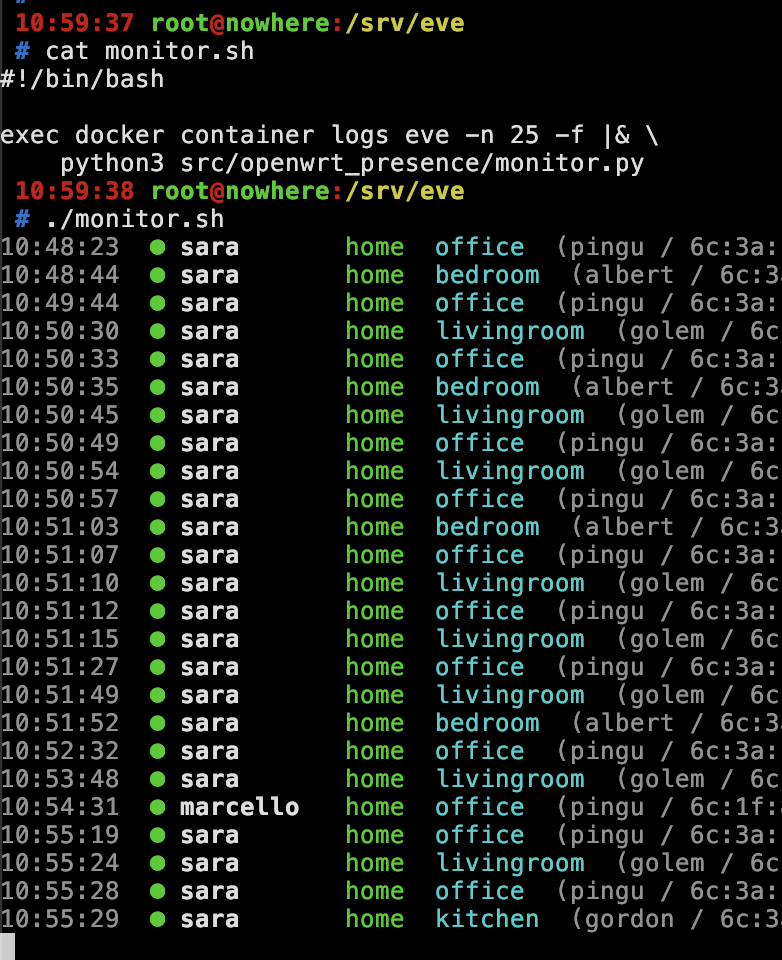
Green bullet for arrivals, red for departures, room names in cyan, RSSI values in the details. Pure stdlib, no dependencies, runs directly with python3.
Alarm Automation
The original itch I was scratching: arm the alarm when everyone leaves. “Everyone” includes the housekeeper, who doesn’t have the HA companion app — her WiFi tracker is the only presence signal I have for her. The automation checks WiFi state for all tracked people, treating unknown and unavailable as “not home” (because if the tracker has never reported, the person is definitely not confirmed inside):
automation:
  - alias: "Arm alarm when everyone leaves"
    trigger:
      - platform: state
        entity_id:
          - device_tracker.alice_wifi
          - device_tracker.bob_wifi
          - device_tracker.charlie_wifi
        to: "not_home"
    condition:
      - condition: state
        entity_id: device_tracker.alice_wifi
        state: ["not_home", "unavailable", "unknown"]
      - condition: state
        entity_id: device_tracker.bob_wifi
        state: ["not_home", "unavailable", "unknown"]
      - condition: state
        entity_id: device_tracker.charlie_wifi
        state: ["not_home", "unavailable", "unknown"]
    action:
      - service: alarm_control_panel.alarm_arm_away
        target:
          entity_id: alarm_control_panel.home_alarm
The unavailable / unknown bit matters. The housekeeper visits twice a week — so between visits, her tracker sits at unknown (never seen) or not_home (last seen days ago). Without those extra states in the condition, the automation would never fire when she’s not around. Ask me how I know.
What’s Next
Nothing. It works. Three architectures later, this one sticks. 74 tests, Docker Compose deployment, runs on my server with detection in under 5 seconds. The code is MIT licensed.
Source: github.com/vjt/openwrt-ha-presence
Have fun!