The Verisure app is garbage. There, I said it.
The alarm itself is fine — the SDVECU panel is solid, the sensors are reliable, the installation is professional. The app is the problem.
The problem
You open the app to check your alarm status and you’re greeted by an ad for Verisure itself. I pay through the nose for the service and they shove ads inside the app. It’s 2026 and a security company is showing me banner ads when I’m trying to verify that my house is protected.
The ads are the least of it:
- Blind routines. Arm at midnight, disarm at 7. The app has no idea where you are. Still in the garden at midnight? The alarm arms and the sensors trip. Window open? The panel announces it can’t arm — if you don’t hear it, the alarm stays disarmed. Forget to disable the morning disarm before going on vacation? Alarm off, empty house. And routine changes take 20 minutes to propagate — “or the next day”. In 2026.
- Zero presence awareness. No location, no who’s home, no cleaning-lady-just-left. No location-based automation at all.
- One camera at a time. Tap, wait, back, tap the next one, wait. No overview, no “capture all”.
- Slow. Request an image, wait, wait, maybe it arrives. Sometimes you reload and try again.
- No permanent storage. Captured images vanish. No history.
- No timestamps on images. You capture a photo and you don’t know when or which camera. You have to remember. For a security system, embarrassing.
- Generic notifications. One notification, same for everyone. No actionable buttons, no critical alerts that bypass Do Not Disturb.
What I wanted: my alarm in my smart home, real automations, notifications for all residents, and a dashboard that shows everything at a glance. No ads.
The solution: Home Assistant + a custom integration
I wrote ha-verisure-italy, a custom component for Home Assistant that talks directly to the Verisure Italy GraphQL APIs (customers.verisure.it). It replaces the app for alarm control and camera monitoring.
What it does
- Alarm control — arm partial+perimeter (“at home”), full+perimeter (“away”), disarm
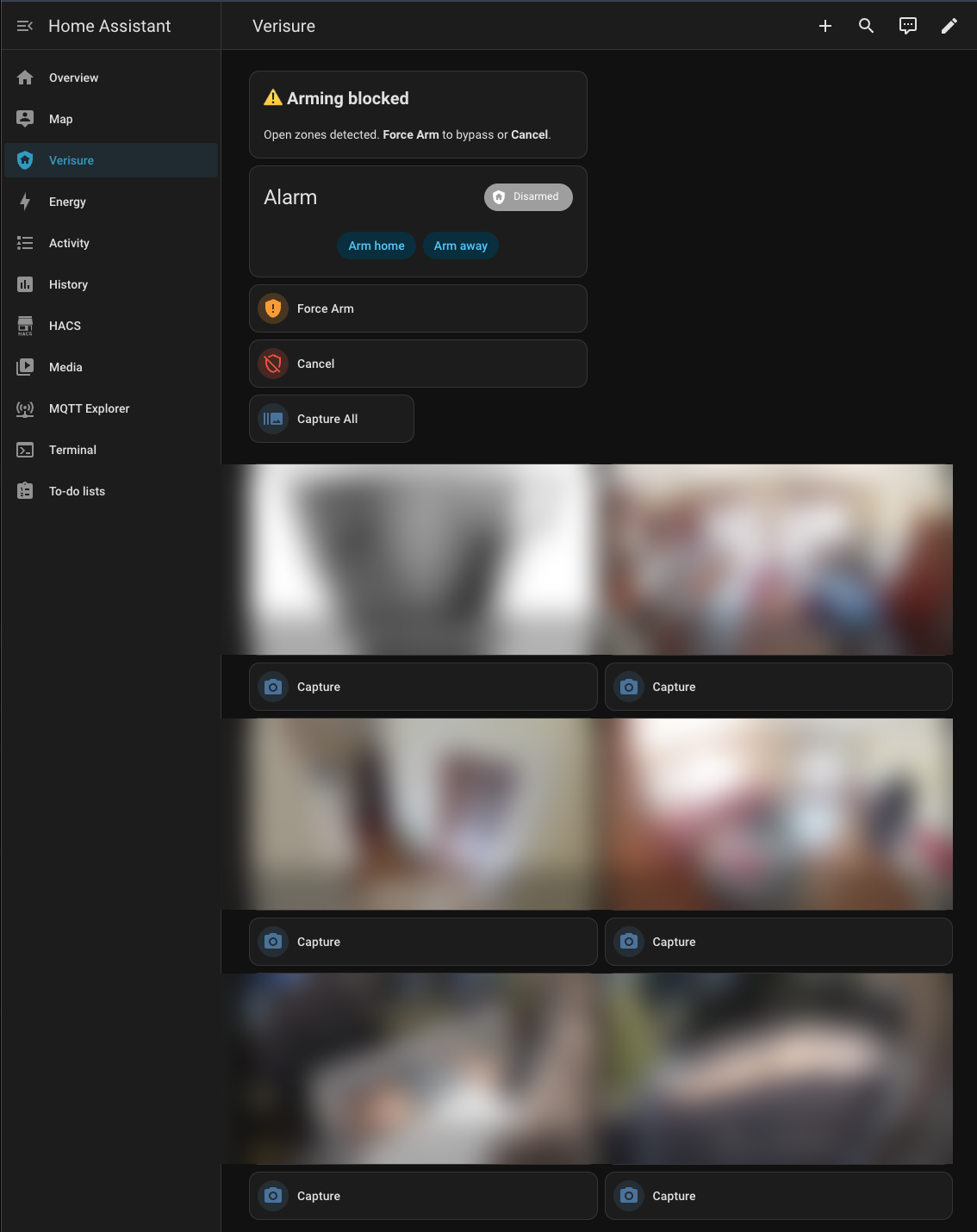
- Force arm — when the alarm won’t arm because a window is open, one tap to force it. Or better: an automation that does it on leave
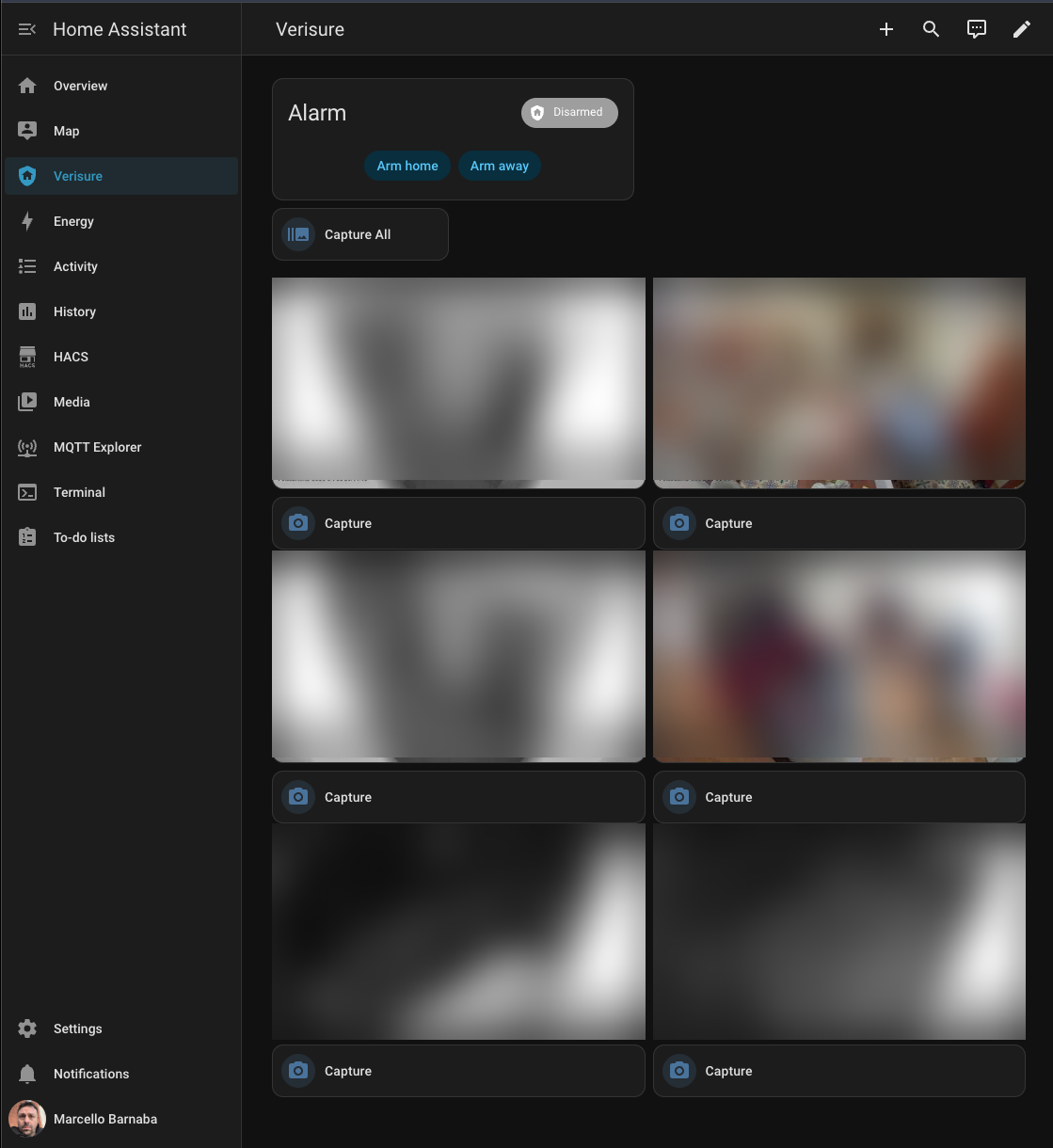
- Cameras — auto-discovered, parallel capture with timestamp overlay, buttons for single camera and “capture all”
- Auto-generated dashboard — alarm panel, camera grid, capture buttons, all wired into the HA sidebar
The automations the app can’t do
What runs in production at my house:
Arm when the last person leaves. A binary sensor tracks who’s home (GPS + WiFi via OpenWrt presence detection). When everyone’s out, the alarm arms.
Safety net. Every 5 minutes, if nobody’s home and the alarm is off, re-arm and notify. Presence sensors get it wrong sometimes.
Automatic force-arm. If the alarm won’t arm because a window is open, the integration detects the block, notifies which zones are open, and forces the arm. An armed alarm with exceptions beats a disarmed alarm.
Smart night arming. Not “arm at midnight”. Arms between midnight and 7 AM only when both residents are home and at rest. In the garden at 2 AM? The alarm waits.
Safe morning disarm. Disarms at 7, but only if someone is home. Beach trip? Alarm stays armed.
Actionable arrival notification. Arrive with the alarm armed? Notification with a “Disarm” button on your phone. Auto-dismisses if disarmed elsewhere.
Critical status notification. Unknown alarm state triggers a critical notification that bypasses iOS Do Not Disturb.
All of this works via CarPlay — alarm status and notifications straight from the car.
Technical design
This is security software, so the integration is conservative: unknown state crashes loud rather than guessing.
Two-layer architecture
- API Client (
verisure-italyon PyPI) — typed GraphQL client, Pydantic models for every request/response, nodict, noAny. Response doesn’t match?ValidationError. Crash loud at the boundary, guaranteed types inside. - HA Integration (
custom_components/verisure_italy/) — alarm control panel, camera, buttons, config flow with 2FA, auto-generated dashboard.
State machine
The Verisure panel has 6 protocol states across two axes: interior (OFF/PARTIAL/FULL) × perimeter (OFF/ON). The state machine enumerates all of them. Unknown state is an error, never a default — the code crashes loud and notifies a human.
Engineering discipline
Pyright in strict mode (0 errors, 14 seconds), 165 tests, Ruff for linting, scripts/check.sh runs everything in one shot. Pydantic models at every HTTP boundary — if the API response doesn’t match, it blows up there, not deep in the codebase. No .get() with silent fallbacks; unknown state is always an error.
Iterations, not big bang
Started as a POC: “can I talk to the Verisure APIs from Python?” Yes. “Can I integrate it into HA?” Yes. From there:
- Working POC
- Basic HA integration (arm/disarm/status)
- Cameras with parallel capture
- Config flow with 2FA
- Auto-generated dashboard
- Force-arm with exception handling
- v0.7.0 — hardening from code review: 3 CRITICAL and 7 HIGH resolved
- v0.8.0 — second review: all HIGH and MEDIUM resolved, pyright clean, 165 tests, thread safety
At every iteration I ran code review with 8 parallel agents (4 line-level + 4 architecture) across every file.
Installation
The integration installs via HACS. If you don’t have it yet, follow the official guide.
Once HACS is active:

Or manually via HACS → Custom repositories → https://github.com/vjt/ha-verisure-italy → Integration.
The API client installs automatically from PyPI. Config flow guides setup with full 2FA support. Dashboard generates itself.
Why isn’t it in the official HA catalog? The integration is young — I’m putting it through its paces with early adopters before submitting it. HACS is the right channel for this stage.
What’s missing
- Permanent image storage. Building blocks are there (captured images are bytes in memory), persistence layer isn’t.
- Event timeline. The API exposes events, we don’t consume them yet.
- Multi-installation support. The code handles one installation; the guard against duplicates is there, multi-install isn’t.
The code is on GitHub, the API client on PyPI, example automations in the documentation.
Happy hacking!