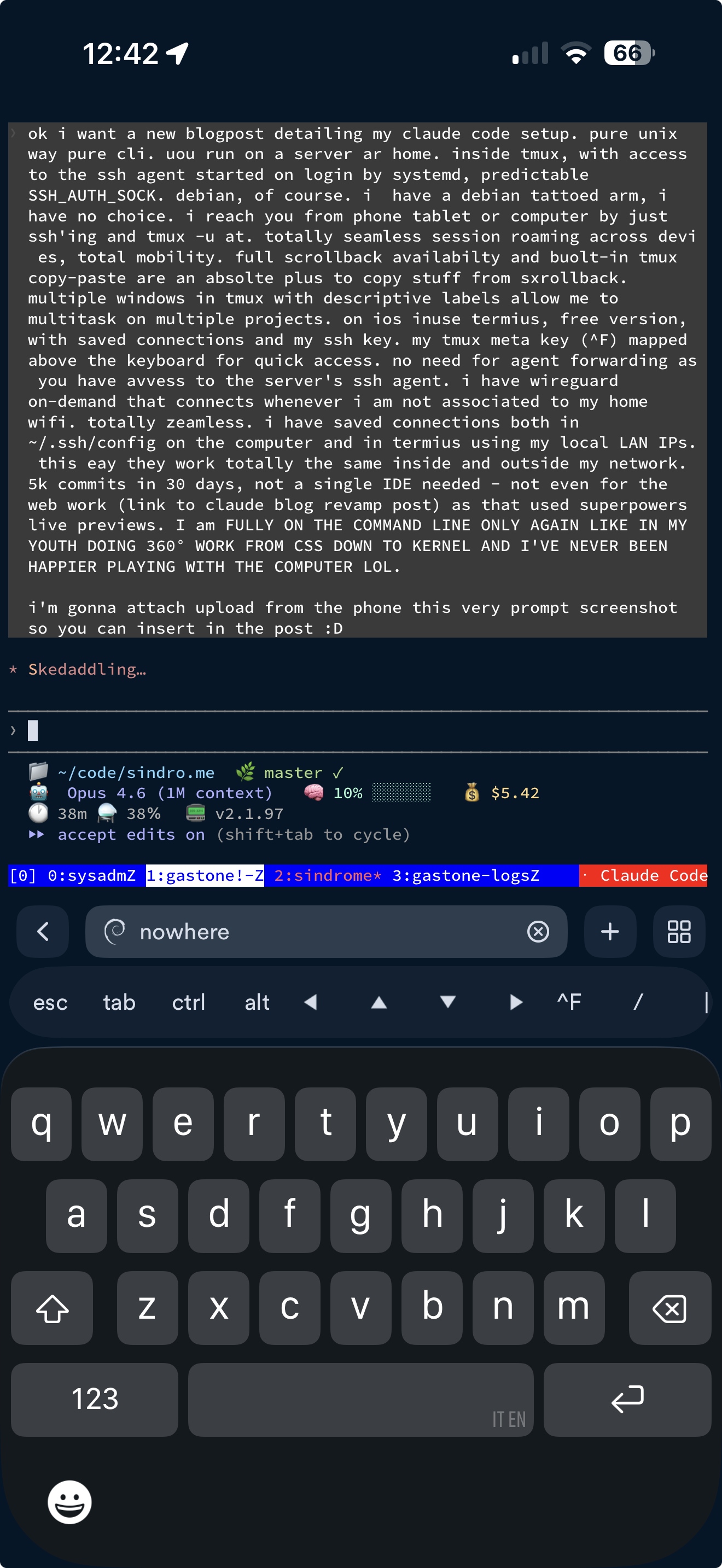
This is me writing this very post. From my phone. Over SSH. In the bathtub, probably.
Claude Code is a CLI tool. It runs in a terminal. And that’s all I needed to hear.
The setup
I have a Raspberry Pi 5 running Debian Trixie at home. It’s called nowhere (long story). Claude Code runs there, inside tmux, 24/7. I reach it from any device — phone, tablet, laptop — by SSH’ing in and reattaching:
ssh nowhere
tmux -u at
That’s it. Two commands and I’m back exactly where I left off. The -u flag enables Unicode support (emoji in status lines, box-drawing characters), and at is short for attach -t 0. The session persists across disconnects, reboots of my client devices, network switches — everything. I can start a task on my laptop, pick it up on my phone while walking the dog, and finish it on the tablet from the couch.
Total session roaming across devices. Zero state lost. Ever.
The Unix philosophy, alive and well
Here’s the stack, bottom to top:
- Debian Trixie (aarch64) — because I have a Debian tattoo on my arm and at this point it’s a commitment
- systemd user unit for
ssh-agent— starts on login, socket-activated, predictableSSH_AUTH_SOCKat/run/user/1000/openssh_agent - tmux — multiplexer, session persistence, scrollback, copy-paste, window management
- Claude Code — the AI that does the actual work
- SSH — the universal transport
No Docker. No Kubernetes. No VS Code remote tunnels. No cloud IDE. No Electron. Just Unix.
The SSH agent trick
The agent is managed by systemd and the socket path is hardcoded in .bashrc:
export SSH_AUTH_SOCK="${XDG_RUNTIME_DIR}/openssh_agent"
This means Claude Code — running inside tmux, inside a shell — automatically has access to my SSH keys. It can git push, ssh into my servers, deploy to staging and prod, all without agent forwarding. The keys live on the Pi, the agent is always running, and every shell (including Claude’s) inherits the socket path.
No -A flag needed from the client side. No agent forwarding security concerns. The Pi is the agent.
tmux: the real IDE
My tmux config uses Ctrl-F as the prefix key (sorry, find, you’re dead to me) and I keep multiple windows with descriptive labels:
0:sysadm 1:gastone 2:sindrome 3:gastone-logs
Each window is a project. Each project has Claude Code running. I can switch between them with ^F 0, ^F 1, etc. Split panes for logs, htop, or a parallel shell when I need it.
The killer features for this workflow:
- Scrollback —
Shift-PageUpdrops into copy mode. I can scroll through thousands of lines of Claude’s output, terminal logs, build output.history-limitis set to 10,000 lines. - Copy-paste — tmux’s built-in copy mode with vi keybindings. Select, yank, paste. No mouse needed (though mouse mode is on for the occasional lazy scroll).
- Pane sync —
^F Ctrl-Ytoggles synchronized input to all panes. Handy for running the same command on split views.
WireGuard: seamless mobility
I have a WireGuard VPN configured as on-demand on all my devices. When I’m on my home WiFi, traffic goes direct over the LAN. When I step outside, WireGuard kicks in automatically and tunnels me back home.
Now, the SSH connection does drop when the endpoint switches from a local LAN IP to a VPN one — TCP doesn’t survive that. But it doesn’t matter: in Termius you tap “Start over”, the connection re-establishes in a second, you type tmux -u at, and you’re right back where you were. The tmux session didn’t go anywhere. Total roundtrip: three seconds.
My ~/.ssh/config on the laptop and the saved connections in Termius both use the Pi’s local LAN IP. WireGuard handles routing regardless of where I physically am. Same IP, same connection, whether I’m in the living room or at a café.
The phone setup
On iOS I use Termius (free version). Saved connection to nowhere, SSH key imported, done. The critical trick: I mapped Ctrl-F (my tmux prefix) to a button above the keyboard. This gives me full tmux control from the phone — switching windows, splitting panes, entering copy mode, all of it.
Scrolling works beautifully — Termius converts touch events to scroll, so I just swipe up and down through Claude’s output with my finger. It feels completely natural.
The phone is surprisingly usable for this workflow. I’m not writing code on it (Claude does that), but I can review diffs, approve tool calls, read build output, check staging, and give Claude instructions. Which is 90% of what I do anyway.
And here’s the thing about typing on a phone: I make an absurd number of typos. Look at the screenshot above — that prompt is riddled with them. But it doesn’t matter. LLMs are fuzzy matchers by nature. They parse intent, not keystrokes. “stsging” is “staging”, “tge” is “the”, “donMr” is “don’t” — Claude never even blinks. This turns what would normally be a friction nightmare (tiny keyboard, fat fingers, autocorrect fighting you) into a non-issue. You type fast, you don’t correct, and it just works. Typos become a feature of the workflow, not a bug.
The results
Over the past 30 days, I’ve made over 5,000 commits across a dozen projects — all from this setup:
- Completely revamped this blog — translated 69 posts, redesigned the layout, added the boot sequence Easter egg. No IDE, no Figma, no design tools. Just Claude Code and the Superpowers live preview for visual work.
- Built a custom Home Assistant integration for Verisure Italy — reverse-engineered their GraphQL API, wrote the full Python component, published to PyPI.
- Created WiFi Dethrash, an OpenWrt mesh network analyzer.
- Wrote a WiFi presence detection system for Home Assistant.
- Built 5G modem tools for OpenWrt.
- Backfilled two years of logs through a full enrichment pipeline.
Every single one of these was done from the terminal. CSS, Python, Go, Lua, shell scripts, Hugo templates, nginx configs, systemd units, kernel-adjacent networking code. The full stack, top to bottom, on the command line.
Why this works
The insight is that Claude Code doesn’t need an IDE because it is the IDE. It reads files, edits them, runs tests, checks build output, iterates. The terminal is its native habitat. Adding a graphical layer on top doesn’t help — it gets in the way.
And tmux is the perfect companion because it gives you everything a modern IDE’s “workspace” concept provides — persistent sessions, multiple contexts, searchable history, pane layouts — without any of the bloat.
I started programming in QBasic on an Olivetti Prodest PC1 — an 8088 — in 1988. I was seven years old, staring at an 80x25 amber terminal, and I thought it was the most magical thing in the world. Then the industry spent 35 years convincing me I needed GUIs, mice, IDEs, visual debuggers, point-and-click deployment tools. Now AI brings me back to a terminal, a keyboard, and the ability to describe what I want in plain language.
I’ve come full circle, and I’ve never been happier playing with computers.