I was sick of driving Download Station from the phone in DSM’s desktop mode: pinch, zoom, tap the wrong row, start over. Synology’s own app is gone, and the others want a subscription.
So this morning Claude Code and I built dsmagnet in about an hour. It is a small DSM package that gives Download Station a screen made for a phone. Copy a magnet link, open the app, paste, pick a folder, Add. Below that are your downloads: a colour per status, progress, seeding measured against the ratio set in Download Station, download and upload speed, pause, resume, remove, filters and sorting.
Install it on your DS: latest release → · all releases
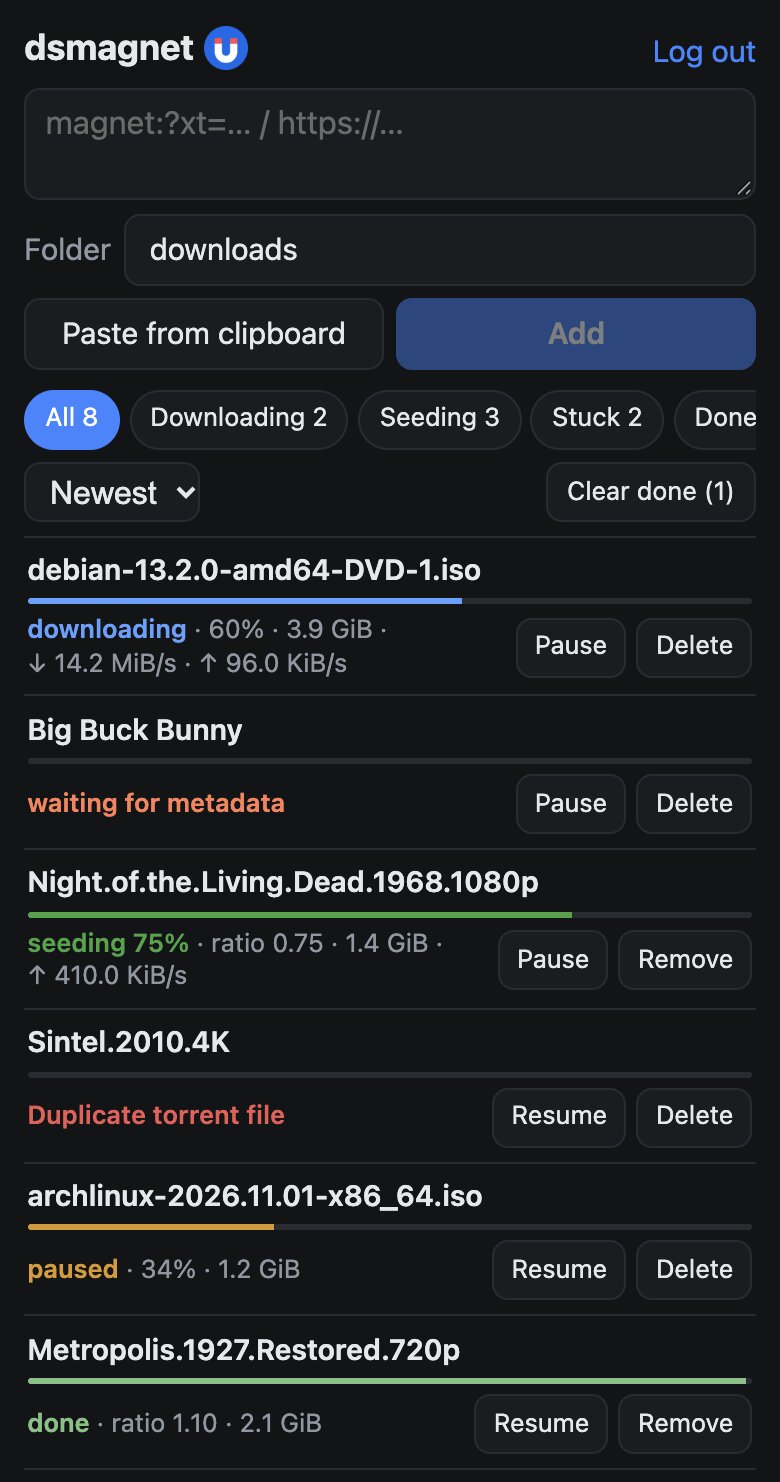
DSM serves it from its own web server and it uses your DSM login, 2-step code included (iOS fills it in). There is no container, no extra port and no second download daemon: Download Station still does all the downloading. Add it to the Home Screen and it behaves like an app.
Install
- Download
dsmagnet-<version>-noarch.spkfrom the latest release. - In DSM: Package Center → Manual Install, pick the file. The package is not signed by Synology, so DSM may warn about it: confirm.
- On the phone, open
https://<your-nas>:<dsm-https-port>/webman/3rdparty/dsmagnet/index.html, then Share → Add to Home Screen, and log in once.
It needs DSM 7 and Download Station. The source is MIT-licensed, on GitHub.