
TL;DR: I migrated my GL-iNet GL-X3000 (Spitz AX) — Jeeves, my 5G
backup uplink —
from stock GL.iNet firmware (OpenWrt 21.02, kernel 5.4) to vanilla OpenWrt
25.12 (kernel 6.12.79). The modem — a Quectel RM520N-GL on PCIe/MHI —
works perfectly. There are four distinct ways to get things wrong before
you get there. I found most of them. This is the map. If you want a
pre-built image, jump straight to the
releases page and
flash the latest jeeves-rN sysupgrade bin.
Why Bother
Jeeves is my 5G backup uplink. When fiber goes down — and fiber goes down, always at the worst possible moment — Jeeves is what saves me from a missed meeting. The hardware is excellent: MediaTek MT7981B (Filogic 820), Wi-Fi 6, USB 3.0, and a Quectel RM520N-GL 5G modem on an M.2 slot wired to both PCIe and USB.
The stock firmware is GL.iNet’s flavour of OpenWrt 21.02, shipping on kernel 5.4. That kernel reached end of life in December 2022. But the kernel age is not the main reason I switched.
The main reason is control. I want to drive every aspect of this connectivity layer myself.
The most visible problem: when 5G drops and only LTE stays up, GL.iNet’s automation does not try to bring 5G back. It just leaves the radio on 4G, indefinitely. My local LTE averages around 5 Mbit/s. If I don’t notice and manually intervene, the backup link sits at 5 Mbit/s for hours before the radio walks itself back to 5G. That is not acceptable for something supposed to cover for fiber outages.
The harder problem is cell locking. My carrier deploys 5G-NSA
(non-standalone), and the moment I asked GL.iNet’s stock tower-lock UI
to lock to a specific tower, the modem stopped attaching to any tower
at all. I suspect this has to do with how their stack drives the NSA
attach, but I never proved it — by that point I already wanted to be
off stock and didn’t feel like reverse-engineering vendor code. So I
wrote my own locking that talks straight to the modem —
5g-lock,
a thin wrapper around AT+QNWLOCK / AT+QNWCFG. That was a losing
battle: GL.iNet’s stack notices out-of-band AT changes and reverts them
on its own schedule. To actually own the radio policy, I needed the AT
path to stay where I left it — and the only way there was vanilla.
Vanilla OpenWrt 25.12 brings mainline MHI/MBIM support for the modem’s PCIe data path (more on those acronyms in a moment), ModemManager integration, the new apk-based package manager, and the entire current package ecosystem. GL.iNet’s firmware is a fork: they ship a useful set of additional packages through their own repositories, but they also run their own update cycle, and tracking their SDK across releases is significantly more work than tracking vanilla. Vanilla is the real thing — and it lets me own every bit of the connectivity stack.
A short glossary for the chart that follows — these are the four numbers any cellular telemetry pipeline tracks per cell:
- RSRP — Reference Signal Received Power. How strong the tower’s signal arrives at the modem. Like how loud a friend’s voice reaches you across a room.
- SINR — Signal-to-Interference-plus-Noise Ratio. How clean that signal is given everything else on the air. Same friend, same voice, but in a quiet library vs a busy café — the dB number is what changes.
- RSRQ — Reference Signal Received Quality. A combined view of signal vs cell load: high when the cell is lightly used, sags when the cell is full of users.
- PCI — Physical Cell ID. Effectively the tower’s name from the modem’s point of view: different number, different cell.
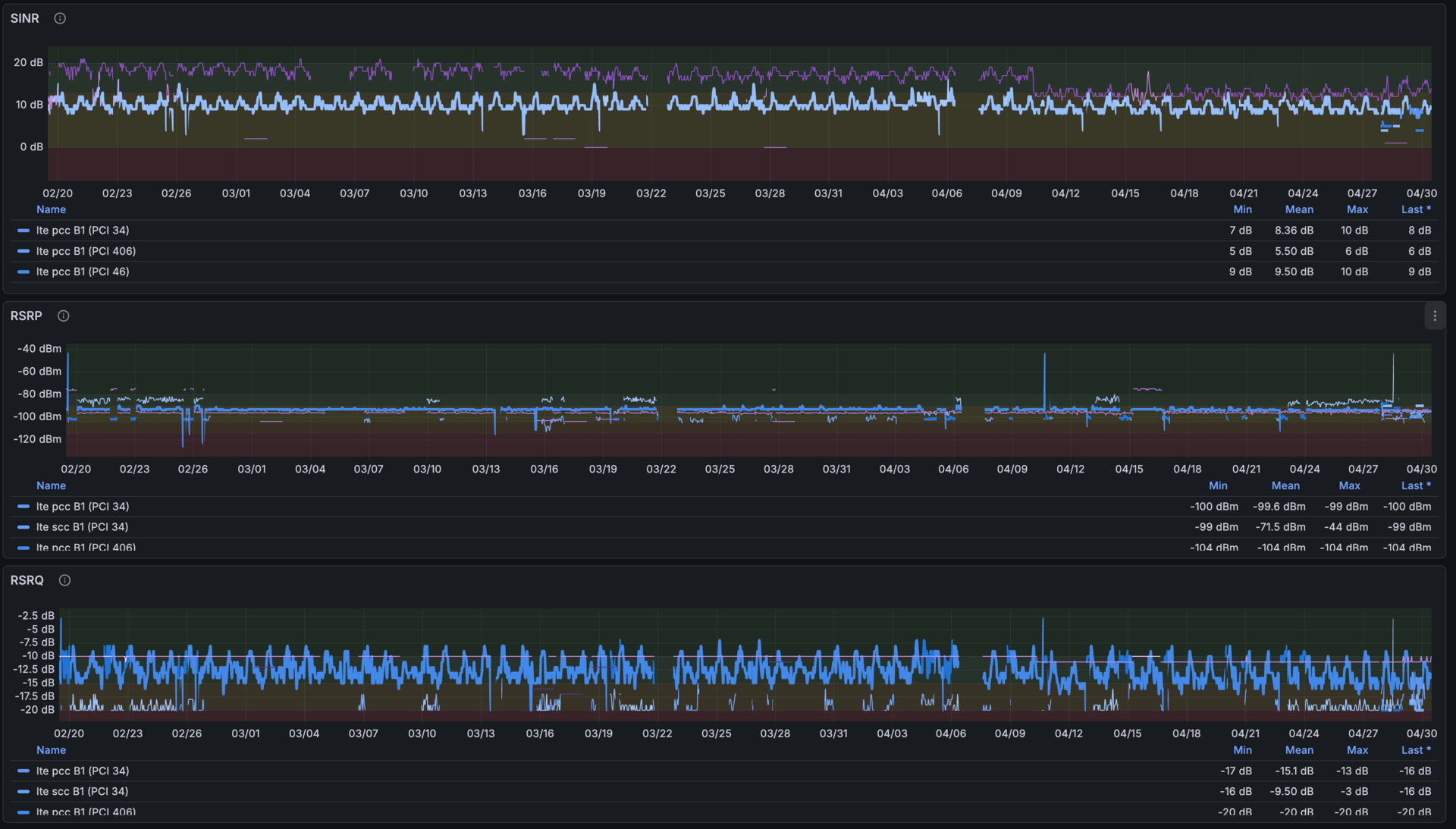
The GL-X3000 is supported by the OpenWrt community — the official wiki entry walks you through 5G connectivity end to end. The catch is that it only covers the modem’s USB data path, which works but cuts throughput significantly below what the radio is actually capable of — the PCIe path is much faster, and I didn’t want a bottleneck on the very link that’s supposed to cover for fiber outages. Going PCIe needs a kernel patch (more on this below) and a custom build. So I built the image myself. It didn’t take that long, but there were a handful of places where the right thing to do wasn’t obvious, and this is what I learned in the process.
The Lay of the Land
The RM520N-GL talks to the host over both PCIe and USB simultaneously, through a small stack of acronyms it’s worth unpacking up front:
- MHI — Modem Host Interface. Qualcomm’s transport layer over PCIe for cellular modems. It carves the PCI link into channels and runs control + data + diagnostic streams on top. Roughly the equivalent of USB endpoints, but on the PCI bus.
- MBIM — Mobile Broadband Interface Model. A USB-IF standard for
carrying network packets and a control channel between host and modem.
On the GL-X3000 it rides on top of MHI; the kernel exposes it as a
netdev plus a control character device (
/dev/wwan0mbim0).
Stock GL.iNet firmware used a proprietary pcie_mhi driver exposing
/dev/mhi_* device nodes. Vanilla OpenWrt uses the upstream
mhi_pci_generic driver, which exposes /dev/wwan0mbim0 (MBIM data
path), /dev/wwan0at0 (AT command port), and friends.
The USB side exposes four serial ports (/dev/ttyUSB0–3) for
AT/NMEA/DIAG commands, and — after a composition switch — an ADB
interface. More on that later.
How to Flash It
The GL-X3000 already runs OpenWrt under the hood — that’s literally why I bought GL.iNet hardware in the first place: I wanted a device with first-class OpenWrt support, not a closed router with a vendor stack. The OpenWrt wiki page for the GL-X3000 documents the procedure clearly: feed the sysupgrade bin to the stock GL.iNet U-Boot web recovery. Don’t try the factory bin — the stock U-Boot validates the image header and rejects it with “Something went wrong during update. Probably you have chosen wrong file.”
The procedure: hold Reset while powering on, set your PC to a static IP in
the 192.168.1.0/24 range, open 192.168.1.1 in a browser, upload the
sysupgrade bin. About 90 seconds. After that, the same sysupgrade bin is
also what you flash for in-place upgrades.
Before flashing, back up the stock bootloader:
ssh root@192.168.253.254
dd if=/dev/mmcblk0boot0 of=/tmp/stock_preloader.bin
dd if=/dev/mmcblk0p4 of=/tmp/stock_uboot_fip.bin
scp root@192.168.253.254:/tmp/stock_*.bin .
You probably won’t need them. Do it anyway.
Pitfall 1: The Modem Needs a Kernel Patch
The RM520N-GL sold with the GL-X3000 is the GLAP variant — slightly different
sub-device PCI ID (17cb:0308, sub-vendor 17cb, sub-device 5201).
The mainline mhi_pci_generic driver doesn’t recognise 5201 out of the
box. The modem doesn’t enumerate. You’re looking at an empty mmcli -L and a
kernel log with nothing mentioning wwan.
The fix is a one-liner kernel
patch
that adds the sub-device ID to the driver’s PCI match table. Without it,
you have a 5G router with no 5G. I ship it as
target/linux/generic/pending-6.12/gl-x3000-quectel-pci-id.patch in the
build tree.
I didn’t figure this out from scratch — I owe the diagnosis (and the patch
itself) to a 2024 GL.iNet community
thread
where other people running the same migration had already worked through
the symptoms. Hat tip to whoever in that thread first chased the missing
5201 sub-device ID.
The same fix was submitted to linux-arm-msm in July 2025 by Michael Fritscher, who hit the same problem. It hasn’t landed in mainline yet — the maintainer raised a question about Quectel reusing Qualcomm’s own PCI vendor IDs, and the patch has been parked pending clarification from Quectel. Until it merges, the out-of-tree patch is the only path.
Pitfall 2: PCIe Runtime Power Management Will Crash Your Modem
This one cost me the most time. Symptoms: the modem comes up fine, ModemManager connects, traffic flows — and then, two minutes later, reproducibly every time, the modem disappears with a cascade of kernel errors:
pci 0000:01:00.0: AER: Correctable error message received
pci 0000:01:00.0: PCIe Bus Error: severity=Correctable, type=Physical Layer
pci 0000:01:00.0: MHI: channel not open
pci 0000:01:00.0: PCIe: ERROR CmpltTO
To make matters worse, the failure also drags the rest of the PCI bus down: every couple of seconds the kernel resets the link, the on-board ethernet port hangs while it does, and SSH stalls. I had a ~one-minute window of usable shell right after boot, then 2–3 second windows roughly every 30 seconds. Debugging it was not exactly ergonomic.
What’s happening: the kernel’s PCIe port power management is putting the PCIe port into D3hot (link power-down). When traffic arrives, the port wakes up, but the MHI bus never fully recovers from the link-down event. The PCIe AER layer starts logging Completion Timeouts. The modem goes silent.
The workaround is blunt:
pcie_port_pm=off
in the kernel command line. This disables PCIe port power management globally. On the GL-X3000 that means the modem link stays at full power. No more crashes — but it’s a workaround, not a fix. The underlying interaction between the MHI driver and the PCIe PM core is still wrong; I’m hoping a future kernel release sorts it out and lets me drop the flag.
Note for the cautious: if the modem does wedge in this state, runtime
mitigations don’t help. The only recovery is a host reboot. You cannot
rmmod and modprobe your way out of a CmpltTO storm.
Pitfall 3: Don’t Casually Reboot the Modem
Related to the above: AT+CFUN=1,1 reboots the modem. On this hardware,
modem reboot while the PCIe link is active can wedge the PCIe host port
into the same error state. The modem goes through its power cycle, the
PCIe link bounces, MHI loses sync, and you’re back to the CmpltTO cascade
without the PM trigger.
This means: if you need to reboot the modem, stop ModemManager first,
issue AT+CFUN=0 to clean radio-off the modem, then bounce it. Or just
reboot the router — it’s faster and less exciting.
Pitfall 4: ModemManager Will Steal Your AT Ports
The vanilla OpenWrt modemmanager package includes a udev/hotplug
rule
(/etc/hotplug.d/tty/25-modemmanager-tty) that hands every USB serial
port that looks like a modem to ModemManager. The RM520N-GL’s
/dev/ttyUSB0–3 all match. ModemManager opens them and keeps them
exclusively — which means my own AT command tooling (more on that below)
can’t talk to the modem while MM is running.
The modem data path goes over PCIe/MHI, so MM doesn’t need the ttyUSB
ports. It uses /dev/wwan0at0 for control. But the hotplug rule doesn’t
know that.
The fix is an ignore list plus a patch to the hotplug
script:
/etc/modemmanager/ignore-tty lists the device nodes to leave alone, and
the patched /etc/hotplug.d/tty/25-modemmanager-tty checks that file
before handing a tty to MM. The patch applies cleanly and fails loudly if
the upstream script drifts.
With this in place, /dev/ttyUSB0–3 stay free for direct AT access. MM
uses /dev/wwan0at0 for everything it needs. Everyone is happy — most
importantly, my telemetry
pipeline keeps reading signal
metrics straight from the modem without a fight.
What I Actually Baked In
The final image — published as jeeves-rN on the
releases page —
includes, beyond the standard OpenWrt 25.12 package set:
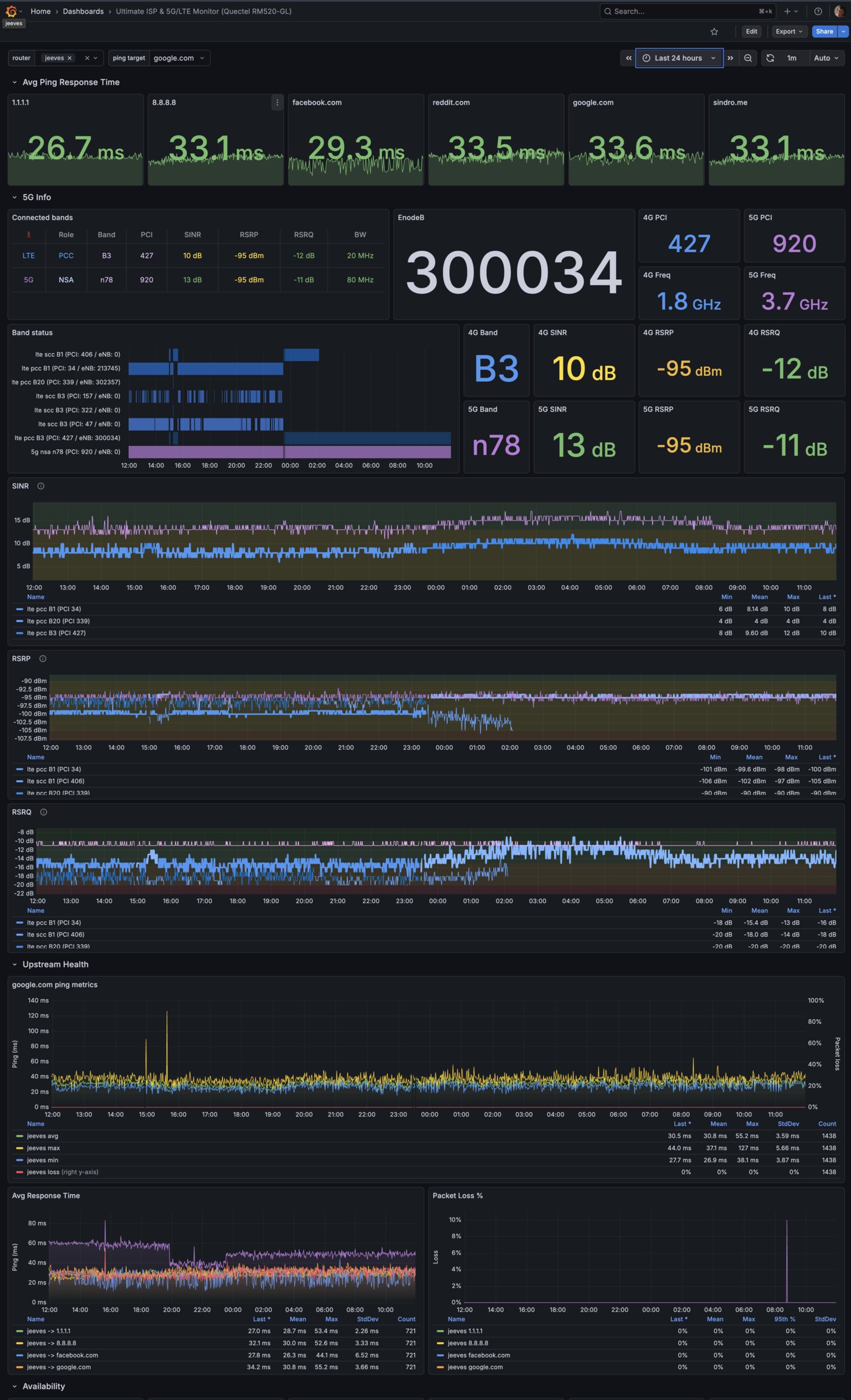
quectel-5g-tools— a collection of Lua tools I wrote for monitoring and interacting with the Quectel modem.5g-infodumps a full snapshot,5g-monitoris a live TUI with signal quality display and configurable audio beeps,5g-lockhandles band and cell locking,quectel-atis a zero-ceremony AT command wrapper. There’s also a Prometheus collector — that’s what feeds this Grafana dashboard — and5g-led-bars, a procd daemon that drives the four signal-bar LEDs on the GL-X3000’s front panel in real time, off the 5G RSRP (signal strength) when the modem is attached, or the 4G RSRP when 5G is down.qfirehose1.4.17 — the standard Quectel firmware flasher. Upstream is currently at 1.7, but I picked 1.4.17 (originallynippynetworks/qfirehose) because it was the version pre-packaged in another reputable OpenWrt feed and had been stable for everyone using it. I forked it to add a clean OpenWrt package recipe so the binary lands directly in the image — built and shipped through my own openwrt-builder like every other custom package on this router.adb+fastboot35.0.2 — for modem USB composition switches and ADB access into the SDX62.wifi-dethrash-collector— a Prometheus collector tracking Wi-Fi parameters, paired with the client-thrash analysis it grew out of.- A rootfs overlay with my internal CA and my package-feed signing keys.
telegraf-full— pushing metrics to my internal VictoriaMetrics.
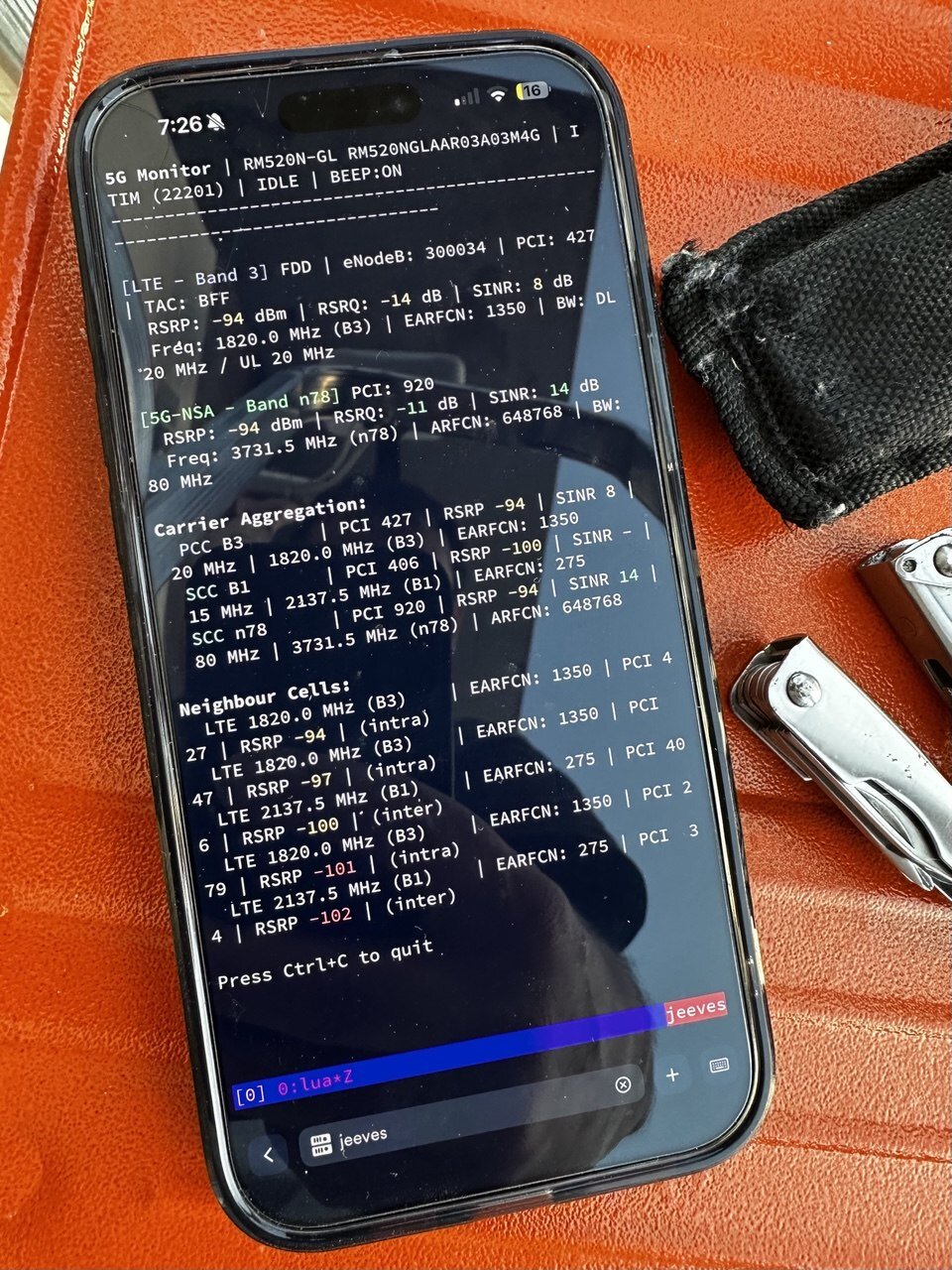
5g-monitor in the field. PCC, SCC, neighbour cells, all the signal you need to decide whether to keep climbing.If my pre-built image doesn’t convince you and you want to build it
yourself — fair enough — I’ve automated the setup. Clone
vjt/openwrt-glinet-x3000,
run x3000/prepare.sh,
and you have a working build tree pinned to OpenWrt 25.12 with every
kernel patch applied and every custom package wired in via feeds.conf.
make from there.
Bonus: There’s Another Linux Inside the Modem
While we’re here: the RM520N-GL runs its own Linux inside the Qualcomm
SDX62 baseband SoC. ADB access into that userland is extremely useful —
logs, firmware diagnostics, /usrdata — and it is locked by default.
There are two locks. First, the ADB USB interface is disabled in the default USB composition. You enable it with a composition switch:
# Inspect current composition
quectel-at 'AT+QCFG="usbcfg"'
# +QCFG: "usbcfg",0x2C7C,0x0801,1,1,1,1,1,0,0   ← ADB off (second-to-last bit)

# Flip the ADB bit on
quectel-at 'AT+QCFG="usbcfg",0x2C7C,0x0801,1,1,1,1,1,1,0'
# OK
Then there’s the second lock — a challenge-response on AT+QADBKEY:
# Step 1: get the challenge
quectel-at 'AT+QADBKEY?'
# +QADBKEY: 12345678

# Step 2: compute the response (offline tool)
./qadbkey-unlock 12345678
# 0jXKXQwSwMxYoeg

# Step 3: submit
quectel-at 'AT+QADBKEY="0jXKXQwSwMxYoeg"'
# OK
The response is not asymmetric crypto. Looking at the seven lines that
compute
it
in qadbkey-unlock — my fork of the original community tool — the
algorithm is plain MD5-crypt: take the hardcoded passphrase
SH_adb_quectel, salt it with the challenge value the modem just gave
you, run crypt(3), slice 15 characters out of the hash. The “secret” is the passphrase, reverse-engineered out of Quectel
firmware years ago. The unlock state survives reboots and modem firmware
upgrades — as long as you stay on a compatible firmware branch.
Once both locks are open, you can shell into the modem’s SoC:
root@jeeves:~# uname -a
Linux jeeves 6.12.79 #0 SMP Tue Apr 28 15:21:30 2026 aarch64 GNU/Linux
root@jeeves:~# adb shell
/ # uname -a
Linux sdxlemur 5.4.210-perf #1 PREEMPT Fri Mar 1 06:52:45 UTC 2024 armv7l GNU/Linux
A router-shaped box. Two SoCs, two architectures, two kernels. The aarch64 one runs your network. The armv7l one runs inside your modem, and you can shell into it.
Heads up, though: Quectel removed AT+QADBKEY? entirely in firmware
RM520NGLAAR_A0.301 and later. EU Radio Equipment Directive
(RED DA) compliance — there’s a whole discussion
thread
about it. Once you flash firmware ≥ A0.301, ADB is gone. There is no
supported path back.
Jeeves is currently on A03A03M4G — comfortably below the A0.301
cutoff. I keep a mandatory checklist before any modem firmware update:
read
AT+QGMR, compare the build identifier against A0.301 lexically, and
either proceed or stop.
Epilogue: The Mystery of the Lost SINR
About two weeks before this migration, my 5G SINR dropped from a baseline of around 18 dB to 12 dB — over the course of a couple of minutes. Same RSRP, same cell, same beam, just 6 dB more noise. Nothing changed on my side. I wasn’t watching the dashboard at the time, and didn’t notice.
The natural thing to do right after flashing vanilla was to run a speed test and verify the performance. ~200 Mbps where I used to see ~350. Oh no, it’s slower. My first instinct was to blame vanilla — a regression caused by the migration I’d just done, somewhere along the new kernel, MHI, or driver path. But I had something the previous me didn’t: long-term telemetry.
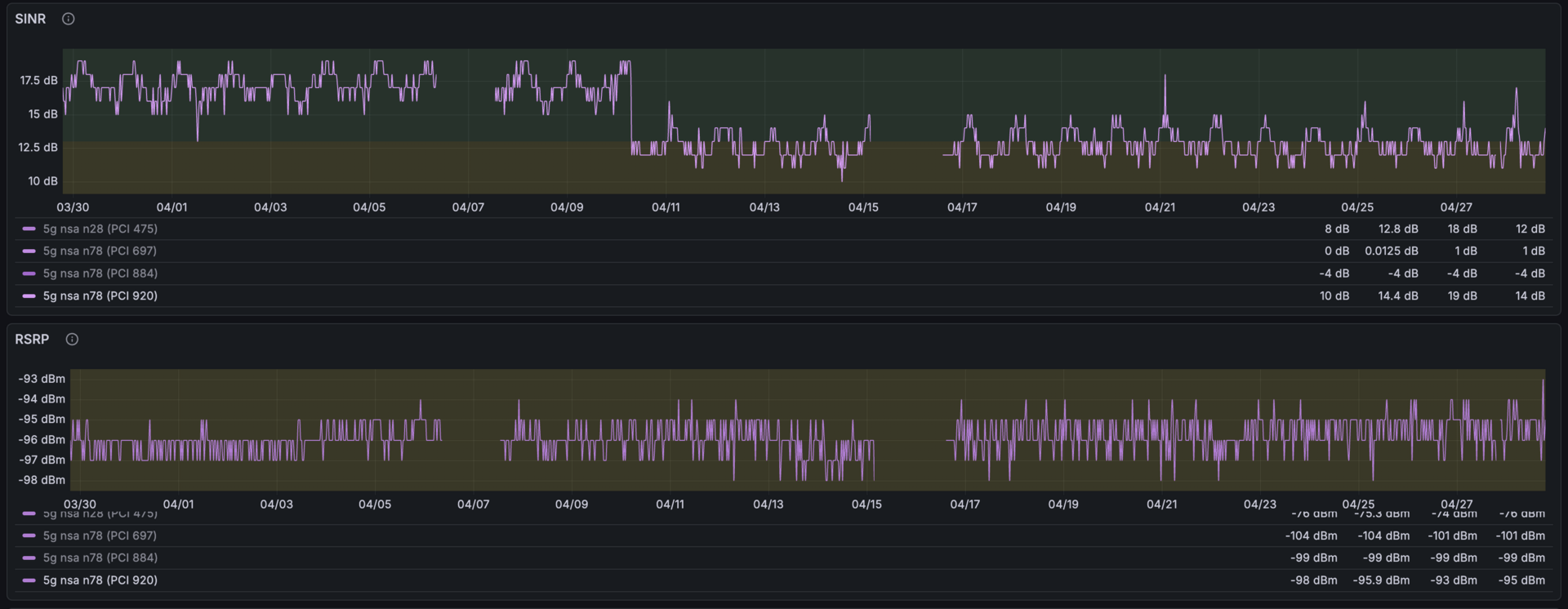
I’ve been collecting RSRP, RSRQ, SINR, band, PCI, and carrier aggregation state via quectel-5g-tools since January, fed into an internal VictoriaMetrics. The telemetry made it unambiguous: the SINR drop happened weeks before I touched the firmware. Same signal strength (flat RSRP), 6 dB more noise, same PCI, no handover. The migration is not the cause. I didn’t roll back to stock — confidence from data, not from hope.
Flat RSRP with SINR down 6 dB means the noise floor rose. The modem is still receiving the same signal from the same tower; there is now significantly more interference on top of it. The preserved daily oscillation (interference is lower at night, when fewer devices are active) tells you the new interference source varies with load, not with weather or geometry. The diagnosis: the carrier almost certainly activated a new n78 cell nearby. The GL-X3000 is on n78 (3.5 GHz TDD), the primary 5G band in Italy and the one being most aggressively densified right now. Nothing to fix on my end. The carrier densified their network. My SINR is collateral damage.
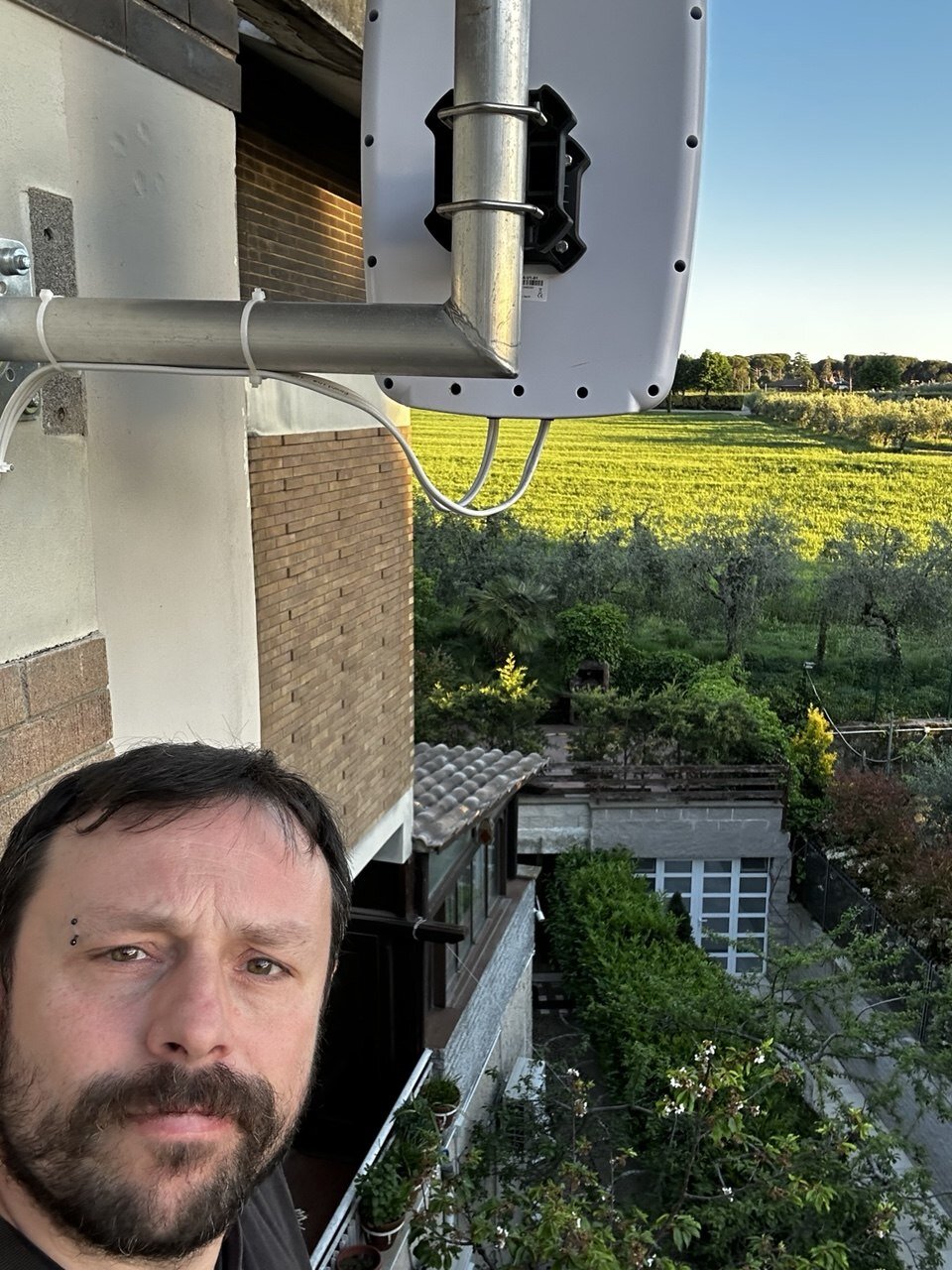
Naturally, I went up a ladder to see if a tighter antenna alignment could claw back a dB.

Vanilla OpenWrt finally gives me the surface I need to write the reconnect logic those outages demand — detect the drop, wait for 5G to come back, flip the radio back automatically. I haven’t written it yet. But now I can.
Reliability is not a setting. Reliability is something you build. And to build it, you need the source.
Everything — kernel patches, custom packages, build scripts, rootfs
overlay — lives in
vjt/openwrt-glinet-x3000.
Pre-built images are tagged on the
releases page
as jeeves-rN — a sensible starting point if you want to skip the
build step.