The real sysadmin is like the old-fashioned car mechanic, the one you brought
your car to adjust the wheels’ convergence and when you got into his garage he
heard also your engine while idling didn’t have the right RPM. He then fixed
the wheels’ convergence and you paid him for it, but he also fixed the engine
idling RPM without asking you anything - he did it because he couldn’t stand a
car that was not set up properly.
He is the one that from every tiny and imperceptible noise immediately guessed
every car problem, even those the customer did not yet realize.
He is the one that after dinner with family went back to his garage, where
you could see the lights on until late at night, because he was working on
“his” jewel, some old vintage car found who knows where that he was slowly
and passionately rejuvenating until it became like new.
The real sysadmin is like that mechanic, and his cars are servers.
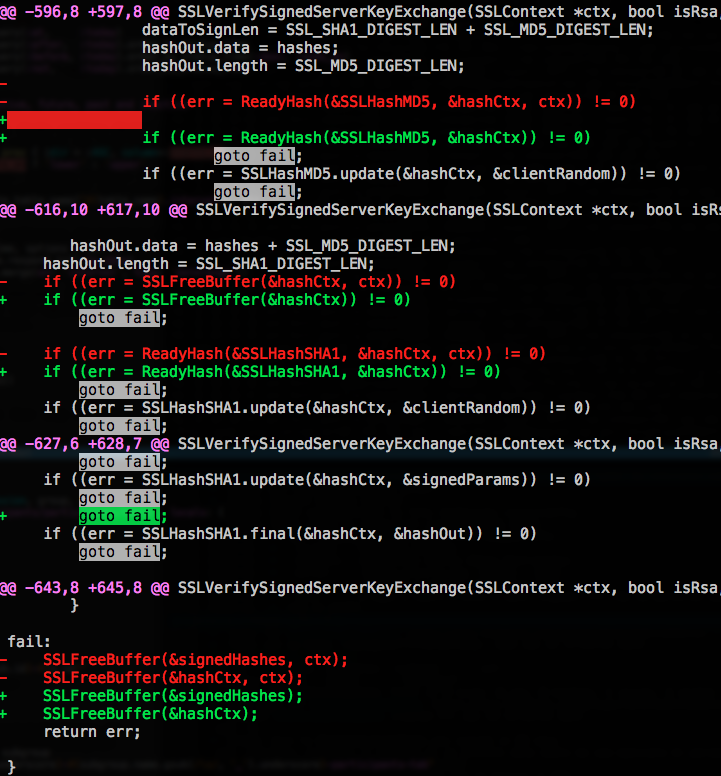
Source code differences between two consecutive versions of the
Security.framework, a macOS/iOS component. The seemingly innocuous extra goto fail; — a duplicated line with no braces around the if body — caused the
SSL/TLS certificate verification to be silently skipped entirely. Any
certificate would be accepted as valid, making every HTTPS connection on
affected devices vulnerable to man-in-the-middle attacks. The bug
(CVE-2014-1266) affected iOS
6/7 and OS X Mavericks, and was patched in iOS 7.0.6 and OS X 10.9.2. It
became one of the most famous examples of why braces matter and why code review
catches what compilers don’t. See ImperialViolet’s technical
analysis for the
full details.
This post was written in 2013. It's preserved here for historical purposes — the technical details may no longer be accurate.
🔍
2026 retrospective
The “contextual help” space exploded into a whole product category — Intercom, Pendo, Appcues and others now do this commercially at scale. IFAD’s fork lived on for years inside the agency. The Rails Rumble itself stopped running after 2015, and the era of 48-hour competition hackathons gave way to AI hackathons and startup weekends. The repo is archived but still up.
The Rails Rumble is — was — a 48-hour hackathon where teams of up to four people build a complete web app from scratch using Ruby. No prep work, no pre-written code. Just caffeine, git, and a deadline.
This year our team — @amedeo, @liquid1982, @maisongb, and me — built Hermes: the epic messenger service, entry #385.
This post was written in 2013. It's preserved here for historical purposes — the technical details may no longer be accurate.
🔍
2026 retrospective
This tiny gem grew to 268 stars and 112 forks, with 32 contributors over 7 years. It learned Bootstrap 3, then 4 with auto-detection (v1.6.0), got a non-Rails mode with dataConfirmModal.confirm() callbacks (v1.2.0), an npm package still pulling 3,700 downloads/week (v1.6.2), and kept working with every Rails version through 6.0. The concept became so mainstream that every UI framework now ships its own confirmation dialog component. The repo is still up.
Not maliciously — they just clicked through a chain of destructive actions, happily dismissing the browser’s confirm() dialogs without reading them. Because nobody reads those. They’re ugly grey system dialogs that blend into the background of your workflow. Click OK, click OK, click OK — and suddenly half the data is gone.
So I fixed it. And then I extracted the fix into a gem, because this problem isn’t specific to our application. Today I’m releasing data-confirm-modal — 116 lines of JavaScript that replace Rails’ built-in confirm() with a Bootstrap modal.
This post was written in 2012. It's preserved here for historical purposes — the technical details may no longer be accurate.
🔍
2026 retrospective
This game used the Facebook Graph API to access your friends list, profile photos, and personal details — name, location, interests, the works. These are exactly the same APIs that Cambridge Analytica exploited in 2018 to harvest data from 87 million Facebook users for political profiling. We built a fun party game; they built a surveillance machine. Facebook shut down these APIs in 2018 after the scandal broke. The game hasn’t worked since. The irony is thick — the same platform features that made silly social games possible also enabled one of the biggest privacy scandals in tech history.
Last weekend we competed in Rails Rumble 2012 — 48 hours to build a web app from scratch using Ruby on Rails, no preparation allowed. Our team was part of the Italian 48rails community, and we built Guess The Friend: a Facebook game that implements the classic Guess Who? board game, but using your real Facebook friends as characters.
This post was written in 2012. It's preserved here for historical purposes — the technical details may no longer be accurate.
🔍
2026 retrospective
ChronoModel is still alive — 14 years, 41 releases, 201 stars. The rules got replaced by INSTEAD OF triggers in v0.6 (2014), the box()/point() hack by proper tsrange columns, and the monkey-patching by a proper adapter registration. Geremia Taglialatela took over maintenance in 2020 and pushed it to v5.0.0 with Rails 8.1 and Ruby 4.0 support. The core idea — updatable views on public, current data on temporal, history on history with table inheritance — never changed. The repo is healthy and actively maintained.
Update, April 2019:ChronoModel reached 1.0 — seven years, 506 commits, and 31 releases later.
We’re building a CRM at IFAD — a UN specialized agency in Rome — and one of the hard requirements is temporal data. We need to know what a record looked like at any point in the past. What was this project’s budget on March 15th? When did this beneficiary’s address change? Who approved what, and what did the record look like at the time?
I’d been prototyping a PostgreSQL schema approach for this — views, rules, table inheritance — and it worked. Then Amedeo, my boss, looked at it and said: “This shouldn’t live inside the CRM. Make it a reusable framework.”
He was right. The temporal pattern has nothing to do with CRM logic. It belongs in a gem.
So I had five days of uninterrupted focus, and today I’m releasing ChronoModel — an ActiveRecord extension that gives your models full temporal capabilities on PostgreSQL. What Oracle sells as Flashback Queries and charges enterprise money for, we can do with standard SQL on Postgres 9.0+.
This post was written in 2011. It's preserved here for historical purposes — the technical details may no longer be accurate.
🔍
2026 retrospective
Debian Squeeze reached end-of-life in 2016, and Node.js now ships official .deb packages via NodeSource or comes pre-packaged in every modern Debian release. You definitely do not want to cross-compile from SID anymore – just use nvm or the official repos.
Abstract: add SID APT source, configure
APT Pinning to give squeeze packages
priority over SID ones, rebuild the nodejs package under squeeze.
Add SID APT source by creating /etc/apt/sources.list.d/sid.list (use
your nearest mirror):
deb http://ftp.us.debian.org/debian/ sid main
deb-src http://ftp.us.debian.org/debian/ sid main
Configure APT pinning by creating /etc/apt/preferences.d/sid:
Install the latest version of libv8 manually, libv8-3.8.9.20 at the time of writing this:
apt-get install libv8-3.8.9.20
Download the nodejs package sources, dependencies and build them:
cd
apt-get source nodejs
apt-get build-dep nodejs
cd nodejs-*
debuild -nc -uc
If you encounter build-dependency errors, you should try first to lower the
dependency in debian/control, both in Build-Depends and in Depends and re-run
debuild. If the build fails (e.g. with undefined reference to 'ev_run') the
previous version is missing required functions. So, you must install the
updated versions of the required dependencies (e.g. libev4) from sid, using
apt-get install name=version e.g. libev4=1:4.11-1. I suggest this because
you’ll have to manually update packages installed from sid, so the lesser, the
best.
This post was written in 2011. It's preserved here for historical purposes — the technical details may no longer be accurate.
🔍
2026 retrospective
Since Linux 4.11 (2017), sysctl net.ipv4.ip_unprivileged_port_start=0 lets any user bind low ports without capabilities — no setcap needed. Also, the Thin web server shown here has been obsolete since Puma became the default Rails server in Rails 5 (2016). And if you’re using Docker, none of this matters anyway.
So you have a Linux VM you use for development, because you want to mirror the
production environment as closely as possible. You have many applications to
deal with, they have to be running at the same time because they are nifty REST
JSON web services.
You are very tired of remembering which one you put on port 8081, and your
configuration files slowly become a real mess. So you set up IP address aliases
in for the network interface and decide to assign even host names –
/etc/hosts is just fine – for each app.
Then, in such a setup, why would you still need to run them on ports higher
than 1024? Wouldn’t it be just great to type the application name in the browser
address bar? Indeed it is, but it’s better to not run them as root, anyway.
The solution is Linux
capabilities
(see also here). The one that
interests us is cap_net_bind_service: it gives a process the right to bind
well-known ports (< 1024). If you use an interpreted language, of course you’ll
have to add the capability to the interpreter itself. That’s why there’s
development in the title of this article – you should not set this up on a
production server, if you don’t know what you are doing.
This post was written in 2011. It's preserved here for historical purposes — the technical details may no longer be accurate.
🔍
2026 retrospective
PH-Neutral was the last edition — true to the motto on the badge, “if it is good, they stop making it.” Phenoelit disbanded shortly after. Many of the attack techniques described here (ASLR bypass, Chip & PIN downgrade, TETRA interception) have since been patched or mitigated, but the underlying lessons about implementation flaws in “secure” technologies remain timeless. The DWARF exploitation research by James Oakley and Sergey Bratus became a seminal paper in the field.
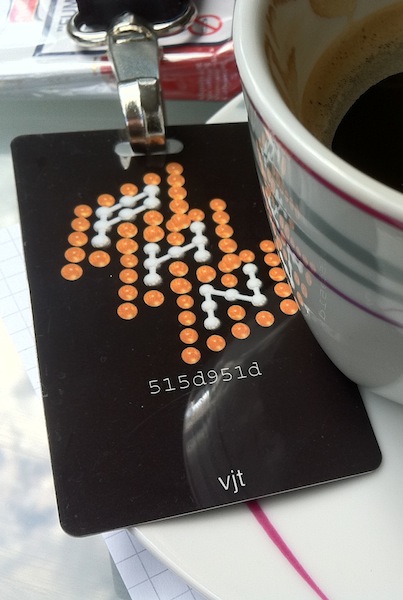
“If it is good, they stop making it”, the
payoff printed on the conference necklaces, distributed to every participant,
along with an über-l33t badge customized with our nickname and the key
hash.
Being my first experience at an international security conf (I’ve only been
to the ccc2k+7 camp), and being a ph outsider ‘cause I never participated
to previous editions, the boot keynote held by FX, staffer and frontman, has been
enlightening: “you ought to be here!”, he yelled while pointing at
the stage, wearing a white shirt with the Phenoelit logo printed on both
arms.
“This conference has never started on time”, he continued,
“so there was no reason to do that for this last one”. the schedule
is straightforward: party, the next day's talks from 12.00PM to 7.30PM, then
party, and the last day's talks from 12.00PM to 5.30PM. definitely a setup
well-playing with the available alcohol :-D.